Live FBA inventory
Available, inbound and reserved units, refreshed automatically.
Inventory Sync +Amazon Seller inventory base
A flat spreadsheet can show what's in stock. It can't cleanly show that one SKU has two suppliers with different lead times, or turn sales velocity into an actual days-until-stockout number. We build that as a real Airtable base — Products linked to Suppliers, stock linked to lead time — so a reorder point means something.
From $400, paid once. No per-seat automation bill.
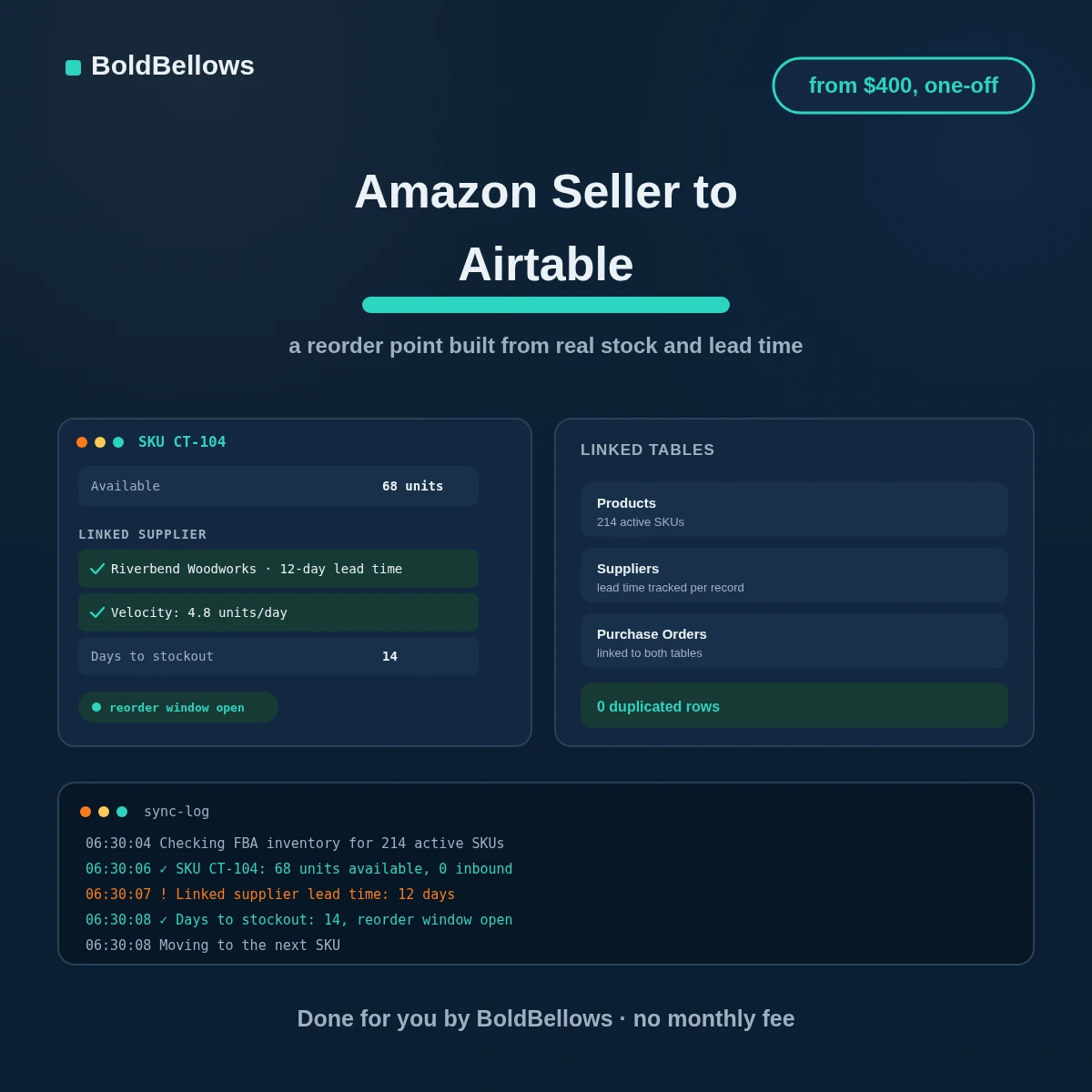
01 · the reorder point nobody's actually calculating
Current inventory is easy to see. What's actually hard is turning that into a real answer — combining how fast a SKU sells with how long a supplier takes to deliver more of it, which live in two completely different places until something connects them.
02 · how it works
A scoped Selling Partner API credential reads inventory and order history on a schedule, and every figure that lands in Airtable traces back to a real Amazon number, never a manual entry someone forgot to update.
Which SKUs have one supplier, which have a backup, and what each one's actual lead time runs, before any table gets built.
Products, Suppliers and, if your package covers it, Purchase Orders, connected the way your real sourcing actually works.
Every active SKU populates before you see the base live, so the reorder figures are already trustworthy on day one.
03 · what shows up in the base
Whoever manages sourcing gets the real answer sitting there already, not a spreadsheet they'd have to cross-reference against a separate supplier list.
A single product record: the supplier it's linked to, how fast it's selling, and how many days remain.
Available, inbound and reserved units, refreshed automatically.
Inventory Sync +Velocity and lead time combined into a number worth acting on.
Reorder Point Tracker +Lead time and contact details, connected directly to the product.
Reorder Point Tracker +A second linked supplier record, not a duplicated row.
Full Supplier BaseEvery order placed, linked to both the product and the supplier.
Full Supplier BaseSee what needs ordering at a glance, sorted by urgency.
Full Supplier Base04 · who it's for
Each role below is trying to answer a version of the same question: what needs ordering, and when. This gives all of them the same reliable number.
"I check three tabs and my memory to know what to reorder."
Now one linked record tells the whole story, updated automatically.
"Backup suppliers live in a separate sheet I sometimes forget to check."
The backup is linked right on the same product record.
"I can't easily see which supplier we've actually paid the most this quarter."
Linked purchase orders make that a filter, not a research project.
"We're past the point where a flat spreadsheet holds together."
A relational base scales with the catalog instead of buckling under it.
Priced by how much the base actually calculates
Inventory Sync, Reorder Point Tracker or Full Supplier Base as your starting point, then how many suppliers per product and how linked the tables should be. From $400, one payment.
05 · compare your options
Two of these can hold numbers. Only one of them connects the numbers to each other the way an actual reorder decision needs.
| Side by side | A flat spreadsheet | Zapier or Make | BoldBellows |
|---|---|---|---|
| Links a product to its supplier's lead time | Only through fragile lookup formulas | No native concept of a relational link | A real linked record, built for it |
| Handles a backup supplier cleanly | Means duplicating the whole row | Same limitation, just automated | A second linked record, nothing duplicated |
| Effort as SKU count climbs | Costs nothing, trust erodes fast | Bills scale up right alongside it | Paid once, from $400, done |
| Who maintains the structure | You, until a formula breaks quietly | Whoever built the zap, if it's still around | Documented, and entirely your own |
A single viral day or a bulk order can make a rolling average look like the new normal, pointing to a reorder that isn't actually needed yet.
The velocity calculation weighs a longer window by default, so one unusual day doesn't swing the whole reorder decision.
A lead time entered once and never revisited can leave a reorder point calculated against numbers that stopped being true months ago.
Lead time lives on its own linked record, so updating it once fixes every product tied to that supplier at the same time.
Pick a package, answer three short questions about what gets tracked, how many suppliers per product, and how the base is structured, and your price and go-live date move as you choose.
06 · process & getting started
Five stages sit between a sourcing conversation and a working base, and we carry nearly all of them. You describe how your suppliers actually work, connect two accounts, and check figures built from your real catalog before it goes live.
Which SKUs have a backup supplier, what a realistic lead time looks like, and how you already think about reorder timing.
You generate the scoped SP-API credential, we get editor access to the Airtable base, both handled on the same call.
Products, Suppliers and whatever else your package covers get built and connected around your real sourcing structure.
Every active SKU populates with real inventory and velocity before you see anything live, so the numbers already check out.
A reference guide walks through every field and link, and the numbers keep refreshing on their own long after handover.
Turnaround begins the moment both logins land in our hands. Paying for a faster tier at checkout is the lever that actually shortens it.
Enough to generate the scoped credential, walked through live if you'd like.
Enough for us to build the tables and set up the automation.
Even an informal one is enough for us to shape the Suppliers table around.
It stays exactly as it is while this gets proven alongside it.
07 · security and ownership
Nothing about how your Amazon listings or pricing work changes because this is live. It reads what's needed to calculate a reorder figure, and that's the extent of what it touches.
Editing a listing or changing a price simply isn't something this credential is able to do.
Nothing here reads or stores anything about who bought what. It's inventory and supplier data, full stop.
Nothing writes anywhere outside the workspace we agreed on during setup.
Revoke either credential and the base freezes exactly where it was, nothing lost.
Each refresh reads, updates the base, and moves on, without a duplicate record kept anywhere else.
Nothing is licensed back to you. Once it's built, every table is ordinary configuration you already own.
08 · verified reviews
Verified reviews from business owners who use BoldBellows automations every day, across operations, support, sales and reporting, on the Amazon Seller to Airtable route.
AI HR & Recruitment Automation
Our HR team was drowning in applications. BoldBellows automated screening, skills-based filtering and interview scheduling.
It saves us hours every week and means we only interview qualified people. Hiring is now faster, better organized and more professional.
AI Lead Qualification & Sales Automation
Our sales team wasted hours chasing cold leads. BoldBellows built an AI lead-scoring system that reads behavior, email engagement and buying signals.
It filters out weak leads and sends personalized follow-ups automatically, so our team only talks to people who are ready to buy. Conversions rose 40% in the first month. It paid for itself straight away.
AI E-commerce Listings Automation
BoldBellows automated our product listings. The AI writes descriptions, organizes photos and publishes listings across several marketplaces.
It even answers customer questions instantly. Our store looks more professional and sales have noticeably increased.
AI Workflow Automation for Agencies
Running a digital agency with many clients was overwhelming. BoldBellows built one automation dashboard that tracks tasks, sends updates and creates client reports automatically.
Clients love the transparency and we love the time we get back. Productivity is up, and project delays have dropped to almost zero.
AI CRM Automation
Our CRM was barely used because updating it by hand was tedious. BoldBellows automated data entry, tagging, segmentation and follow-ups.
Now the CRM is always up to date and our campaigns are far more accurate. It improved our whole sales pipeline.
AI Chatbot & Customer Support
BoldBellows built an AI support chatbot for our online boutique, and it has changed how we run the business. We used to have two full-time staff answering the same questions all day. Now the AI handles order tracking, product recommendations and even refund requests on its own.
What surprised me most is how natural it sounds. Customers compliment the ‘agent’ without realizing it’s AI. Our support workload dropped by 75% and customer satisfaction went up dramatically.
AI Document & Contract Automation
Onboarding was slow because we wrote every contract by hand. BoldBellows automated the lot: contracts, welcome emails and client setup.
What took 48 hours now takes under 10 minutes, and clients regularly tell us how professional it feels.
AI Translation & Localisation
When we expanded abroad we needed fast, accurate translations. BoldBellows built an AI translation system that turns our content into several languages instantly.
The translations read naturally and suit each culture. We now serve customers in five new countries without hiring translators. BoldBellows helped us go global.
AI Accounting & Invoice Automation
BoldBellows automated our whole invoicing process: creating invoices, sending reminders and tracking payments.
Late payments dropped sharply, and our accounting team finally has time for strategy instead of repetitive admin. Worth every penny.
AI Content & Social Media Automation
Our marketing agency couldn’t keep up with content. BoldBellows set up an AI content engine that writes blog posts and captions and even designs our social media creatives.
It spots trends and suggests topics for us, so we stay ahead of competitors. We now produce three times the content with the same team, and engagement has soared. They didn’t just automate our workflow, they lifted our whole brand.
AI Video & Voice Automation
We publish product videos every week, and BoldBellows introduced us to AI video automation. The system writes the script, voices it and produces the finished video in minutes.
The quality is remarkable: professional voiceovers, clean visuals and smooth editing. Production time went from three days to under 30 minutes, and we scaled our video marketing without adding cost.
AI Email & Smart Inbox Management
Our inbox used to be chaos. BoldBellows built an AI email system that sorts messages, drafts replies and flags anything urgent.
It learns how we write and gets better every week. We reply faster and no longer miss important messages. It feels like having a personal assistant working around the clock.
AI Booking & Scheduling Automation
Our coaching business needed a better way to schedule. BoldBellows automated all of it: bookings, reminders, cancellations and follow-ups.
No-shows fell by 60% and clients enjoy how smooth it is. It feels personal, not robotic. One of the best upgrades we’ve made.
AI Data Entry & Reporting Automation
We used to spend hours collecting data and building weekly reports by hand. BoldBellows automated all of it.
The reports are clean, visual and easy to read, and our managers rely on them for quick decisions. Human error is gone and our numbers are more accurate across the board.
AI Customer Journey Automation
We wanted a smoother path from first contact to purchase. BoldBellows built an AI system that guides each customer there automatically.
It sends personalized messages, recommends products and follows up at just the right moment. Customer retention has improved dramatically.
AI Social Comment & DM Automation
We get thousands of comments and messages every week. BoldBellows built an AI system that replies instantly, filters spam and surfaces the important ones.
Engagement is up and our page looks active around the clock. It’s like having a full social media team that never stops.
AI Voice Assistant
BoldBellows built a custom AI voice assistant for our customer hotline. It answers questions, books appointments and handles simple requests.
Customers love how fast it is, and our call-centre workload dropped dramatically. One of the smartest upgrades we’ve made.
AI Automation Partner
BoldBellows is hands-down the best AI automation partner we’ve worked with. Their systems are fast, reliable and built around how our business actually works.
Every automation they’ve delivered, from customer service to content, runs flawlessly. We’ve saved time, cut costs and grown faster than we expected.
09 · questions
Gathered from actual sourcing calls that led to past builds going live. Anything unique to your own supplier network is worth raising in a quote request.
Current available inventory divided by a rolling sales velocity gives a raw runway, and the reorder point subtracts the linked supplier's lead time from that, so it flags when there's still enough time to act.
Update it once on the Supplier record, and every product linked to that supplier recalculates immediately. Nothing needs updating row by row.
Yes, with the backup-supplier option. Each one is its own linked record with its own lead time, not a duplicated product row.
Moving a number between two apps is easy enough, but neither has a native concept of linking a product to a supplier record the way Airtable actually works, so you'd end up faking the relationship anyway, on top of billing that climbs with your SKU count. We build the real structure once instead.
The multi-marketplace extra tracks each one's stock separately inside the same base, or it moves to a custom quote if your footprint goes well beyond that.
No. The credential only reads, nothing sits stored between refreshes, and the price you pay up front is the only bill you'll see.
A stalled refresh is usually the first symptom, catchable within a day or two of watching the log. Add aftercare and repairing whatever it touches is covered for the next 90 days, no second invoice.
Stop guessing when a SKU is about to run out
Build your price below, or describe a bundle-composition tracker, a multi-brand supplier network, or a base structure these three packages don't name. From $400, one payment, nothing added to the bill afterward.
Running a sourcing setup these packages don't quite capture? Send the details over and we'll come back with a real number for the base you actually need. It is also the answer to sync amazon seller orders to airtable, amazon seller airtable integration and amazon seller airtable database sync.