"Our channel got forty pings in an hour, all from the same size selling out."
Every individual sale triggered its own message instead of one shared conversation about the shortage.
BoldBellowsOne thread per shortage, not a flood
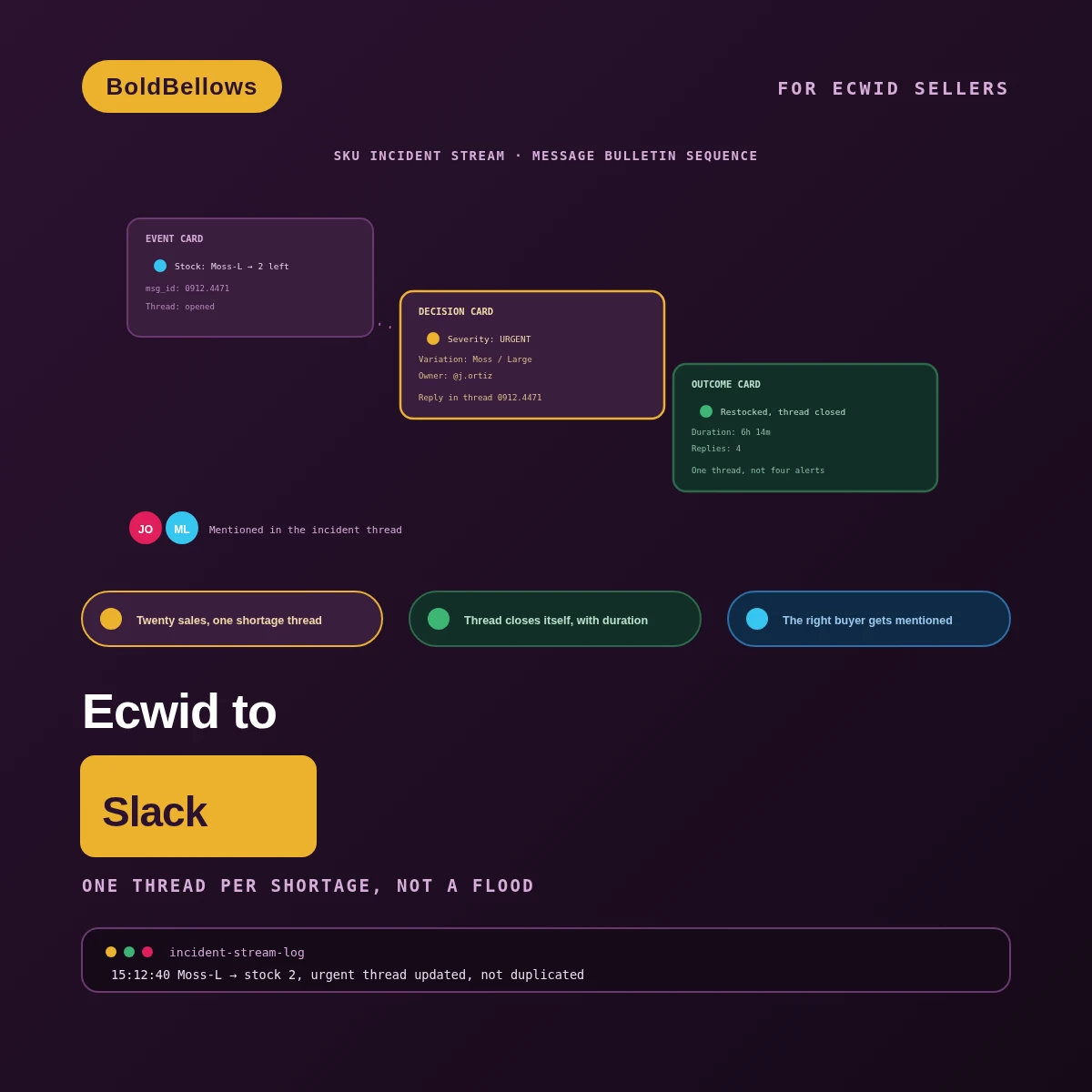
Twenty sales of the same low-stock size and color shouldn't mean twenty separate alerts. We open one thread the moment a shortage starts, keep every related event replying inside it, and close it automatically with a recorded duration the instant stock comes back.
From $275, paid once.
No monthly alerting fee.
01The alert-flood trap
A popular variation runs low and every subsequent sale fires its own notice. Within minutes the channel is unreadable, the actual shortage is buried under duplicate pings, and nobody can tell whether they're looking at one situation or several.
Every individual sale triggered its own message instead of one shared conversation about the shortage.
A bare product name in the alert left the buyer guessing at the exact color and size involved.
Alerts fired going down but nothing ever announced going back up, so old threads stayed permanently open.
A channel drowning in duplicate pings trains people to stop reading it, right when a real shortage needs eyes on it. The incident stream exists so one shortage looks like one thread, every time.
Same low-stock rush, same channel. The difference is whether Slack shows one owned thread per shortage, or a scroll of identical-looking alerts nobody wants to open.
Before
After
02How it works
A stock change enters a stack of three chambers stacked one above the other, moving from neutral, to amber, to a confirmed green only once each chamber's own condition is satisfied. A side note at each level names exactly what's still blocking it from moving up.
03Inside the incident-stream build
Incident Stream Thread ships with incident coalescing and a quiet-hour digest. Variation precision and severity bands join at Incident Stream Severity. Owner mentions and automatic closure complete the model at Incident Stream Resolution.
Incident Stream ThreadIncident Stream SeverityIncident Stream Resolution
Keeps every repeated drop inside a single shortage thread.
Batches noncritical updates outside business hours, urgent alerts still post live.
Names the exact color and size instead of just the parent product.
Routes warning, urgent and out-of-stock events with different urgency.
Tags the specific buyer responsible for that product category.
Closes the thread when stock returns and logs how long it took.
Rechecks recent stock levels the live feed might have missed.
Stays watching through a full restock cycle, not just launch week.
04Who it's for
Warehouse leads triaging what's actually scarce, buyers planning what to reorder, support leads checking a backorder for a customer, and store owners keeping an eye on the SKUs that matter most.
Sees one owned thread per shortage instead of piecing it together from a scroll of identical pings.
Gets mentioned directly on the categories that are actually their responsibility, not every shortage across the store.
Can look up whether a specific variation's thread is still open before promising a customer a date.
Sees severity bands surface the products that genuinely need attention, not routine restocks.
05Compare
A raw incoming webhook can post a stock alert into Slack in minutes. Coalescing every related sale into one thread, tracking closure, and mentioning the right owner is where that raw alert stops being enough.
| What real shortage tracking needs | Manually monitored channel | Raw incoming webhook | BoldBellows build |
|---|---|---|---|
| Message volume | Whatever a person remembers to post | One message per event, no grouping | YesOne thread absorbs every related event |
| Resolution tracking | Depends on someone checking back | No concept of open or closed | YesThreads close themselves with a duration logged |
| Ownership | Whoever happens to see it first | Not addressed at all | YesThe responsible buyer is mentioned directly |
| Signal clarity | Buried in general chat | Every event looks equally urgent | YesSeverity bands separate urgent from routine |
Stock briefly rises above the threshold only because a failed order got released back into inventory. The system re-checks the real Ecwid state before deciding the incident actually resolved, rather than closing the thread on a blip.
A product has ten color-size combinations and only one is actually running low. Identity tracks the exact combination ID, so the other nine variations never get swept into an alert that doesn't concern them.
PricingClear, one-off packages
Incident Stream Thread, Severity and Resolution differ mainly in how much routing intelligence and closure logic runs on top of the base thread. Tell us how your team likes to be alerted, and the price adjusts as you configure it. Incident Stream Thread opens at $275.
View PricingPick a package, answer three short questions about trigger scope, identity and failure policy, and your price and turnaround move as you choose.
06The process
Incident Stream Thread is the fastest package by a wide margin, since coalescing repeated drops into one thread is a narrow, well-defined job. Incident Stream Severity takes a bit longer, because severity bands need real threshold data from your catalog to calibrate correctly. Incident Stream Resolution runs longest of the three, since owner mentions have to map cleanly onto your actual buying team before we trust the automation. Got a big restock or a product launch coming up? Give us a heads-up and we'll factor the volume into the build.
We review how a recent low-stock episode actually played out in your channel, and what a better version would have looked like.
You decide what counts as urgent, which buyer owns which category, and where each severity level should post.
Incident coalescing, severity bands and owner mentions all go live against your real Ecwid catalog and Slack channels.
A burst of sales on one scarce variation, a false-recovery blip, and a Slack delivery failure all get rehearsed before launch.
We track one genuine low-stock episode from its opening thread through to automatic closure before your team takes the wheel.
07Security and ownership
The Ecwid connection only reads product and stock fields — nothing about customers, orders or pricing is part of this build. In Slack, the app posts and threads messages in the channels you name; it has no reach into your other channels, files or member directory.
The build reads product and inventory fields only — your customer records and payment data are entirely out of scope.
The app can only post and thread inside the channels it's explicitly invited to — it can't browse anywhere else in your workspace.
Whatever authorizes the connection stays in the automation environment — it's never printed into a channel, a thread, or a bot profile.
Because the incident key ties to product and open-timestamp together, a replayed event replies to the existing thread instead of starting another.
What's kept for troubleshooting is product references and thread outcomes — never a copy of customer or order data.
Your team receives the threshold logic, severity mapping and owner assignments — nothing stays locked in our heads after launch.
08In their words
Verified reviews from inventory and merchandising teams who trust BoldBellows automations to keep their alerts readable.
AI Workflow Automation for Agencies
Running a digital agency with many clients was overwhelming. BoldBellows built one automation dashboard that tracks tasks, sends updates and creates client reports automatically.
Clients love the transparency and we love the time we get back. Productivity is up, and project delays have dropped to almost zero.
AI Accounting & Invoice Automation
BoldBellows automated our whole invoicing process: creating invoices, sending reminders and tracking payments.
Late payments dropped sharply, and our accounting team finally has time for strategy instead of repetitive admin. Worth every penny.
AI Social Comment & DM Automation
We get thousands of comments and messages every week. BoldBellows built an AI system that replies instantly, filters spam and surfaces the important ones.
Engagement is up and our page looks active around the clock. It’s like having a full social media team that never stops.
AI Content & Social Media Automation
Our marketing agency couldn’t keep up with content. BoldBellows set up an AI content engine that writes blog posts and captions and even designs our social media creatives.
It spots trends and suggests topics for us, so we stay ahead of competitors. We now produce three times the content with the same team, and engagement has soared. They didn’t just automate our workflow, they lifted our whole brand.
AI Translation & Localisation
When we expanded abroad we needed fast, accurate translations. BoldBellows built an AI translation system that turns our content into several languages instantly.
The translations read naturally and suit each culture. We now serve customers in five new countries without hiring translators. BoldBellows helped us go global.
AI Customer Journey Automation
We wanted a smoother path from first contact to purchase. BoldBellows built an AI system that guides each customer there automatically.
It sends personalized messages, recommends products and follows up at just the right moment. Customer retention has improved dramatically.
AI Video & Voice Automation
We publish product videos every week, and BoldBellows introduced us to AI video automation. The system writes the script, voices it and produces the finished video in minutes.
The quality is remarkable: professional voiceovers, clean visuals and smooth editing. Production time went from three days to under 30 minutes, and we scaled our video marketing without adding cost.
AI Voice Assistant
BoldBellows built a custom AI voice assistant for our customer hotline. It answers questions, books appointments and handles simple requests.
Customers love how fast it is, and our call-centre workload dropped dramatically. One of the smartest upgrades we’ve made.
AI Chatbot & Customer Support
BoldBellows built an AI support chatbot for our online boutique, and it has changed how we run the business. We used to have two full-time staff answering the same questions all day. Now the AI handles order tracking, product recommendations and even refund requests on its own.
What surprised me most is how natural it sounds. Customers compliment the ‘agent’ without realizing it’s AI. Our support workload dropped by 75% and customer satisfaction went up dramatically.
AI Lead Qualification & Sales Automation
Our sales team wasted hours chasing cold leads. BoldBellows built an AI lead-scoring system that reads behavior, email engagement and buying signals.
It filters out weak leads and sends personalized follow-ups automatically, so our team only talks to people who are ready to buy. Conversions rose 40% in the first month. It paid for itself straight away.
AI Email & Smart Inbox Management
Our inbox used to be chaos. BoldBellows built an AI email system that sorts messages, drafts replies and flags anything urgent.
It learns how we write and gets better every week. We reply faster and no longer miss important messages. It feels like having a personal assistant working around the clock.
AI Booking & Scheduling Automation
Our coaching business needed a better way to schedule. BoldBellows automated all of it: bookings, reminders, cancellations and follow-ups.
No-shows fell by 60% and clients enjoy how smooth it is. It feels personal, not robotic. One of the best upgrades we’ve made.
AI HR & Recruitment Automation
Our HR team was drowning in applications. BoldBellows automated screening, skills-based filtering and interview scheduling.
It saves us hours every week and means we only interview qualified people. Hiring is now faster, better organized and more professional.
AI Data Entry & Reporting Automation
We used to spend hours collecting data and building weekly reports by hand. BoldBellows automated all of it.
The reports are clean, visual and easy to read, and our managers rely on them for quick decisions. Human error is gone and our numbers are more accurate across the board.
AI E-commerce Listings Automation
BoldBellows automated our product listings. The AI writes descriptions, organizes photos and publishes listings across several marketplaces.
It even answers customer questions instantly. Our store looks more professional and sales have noticeably increased.
AI Document & Contract Automation
Onboarding was slow because we wrote every contract by hand. BoldBellows automated the lot: contracts, welcome emails and client setup.
What took 48 hours now takes under 10 minutes, and clients regularly tell us how professional it feels.
AI CRM Automation
Our CRM was barely used because updating it by hand was tedious. BoldBellows automated data entry, tagging, segmentation and follow-ups.
Now the CRM is always up to date and our campaigns are far more accurate. It improved our whole sales pipeline.
AI Automation Partner
BoldBellows is hands-down the best AI automation partner we’ve worked with. Their systems are fast, reliable and built around how our business actually works.
Every automation they’ve delivered, from customer service to content, runs flawlessly. We’ve saved time, cut costs and grown faster than we expected.
09FAQ
Curious how this handles your specific catalog? Request a quote and describe your worst recent alert flood — we'll walk you through exactly how the incident stream would have handled it.
Manual checking is exactly what lets a real shortage go unnoticed until it's already cost you sales. This build keeps the notifications but removes the flood, so someone can actually watch the channel without wanting to mute it.
Yes, that's part of the severity-band setup. Routine warnings might land in a general inventory channel while out-of-stock events go somewhere your team checks more urgently — you decide the mapping during setup.
It doesn't. This page's price is the build itself; whichever Slack plan you're already on keeps billing separately, and a free Slack plan works fine for most of what this build does.
Your handoff documentation names every Slack API call this build depends on. If Slack changes something that call relies on, the workflow is built to stop and flag it rather than post a broken or duplicated message.
Yes, that's the historical incident import. We reconstruct a bounded window of your past shortage episodes as closed reference threads, so you can see the before-and-after before committing to anything further.
Yes, with the second-workspace add-on or by routing both into shared channels, depending on how separate you want the two operations to stay. We map this out with you before the build starts. This page also answers searches for ecwid to slack, ecwid orders slack notification and ecwid slack alert automation.
Next stepStop letting a shortage flood the channel
Describe a recent stock alert flood that made your channel unreadable, and who should have been mentioned when it happened — send that over and we'll come back with a number. Incident Stream Thread starts at $275.