"The sheet suddenly had a new column nobody asked for."
A cloned widget's field showed up under a slightly different key, and the sheet grew a duplicate column instead of matching the existing one.
BoldBellowsOne sheet, any number of clones
Duplicate a widget onto a new page and its field IDs quietly change underneath, even when the labels look identical. We resolve every clone through a shared field-ID dictionary, so your Google Sheet keeps the same columns no matter how many pages feed it.
From $275, paid once.
No monthly connector fee.
01The drifting-columns trap
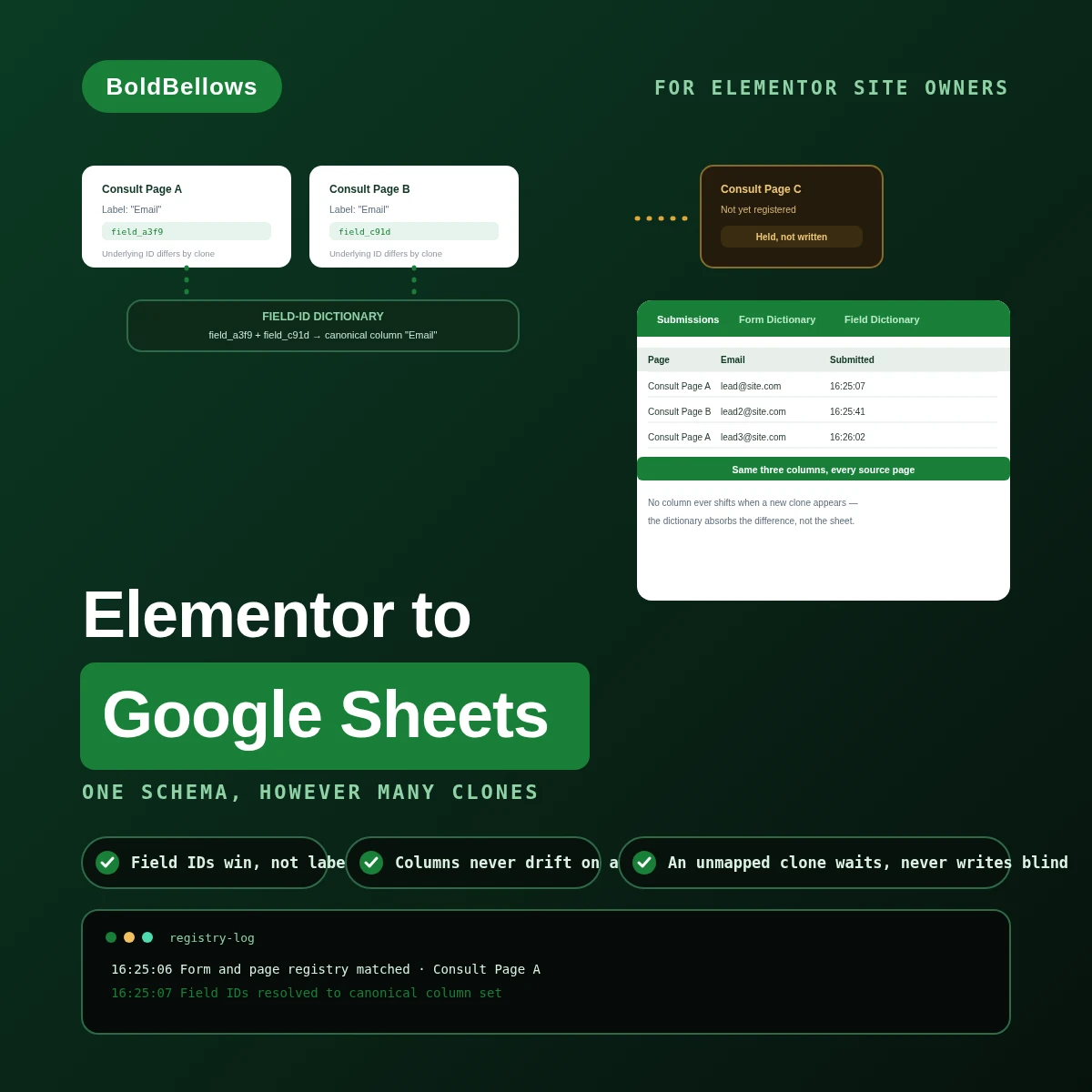
Clone an Elementor form onto a new landing page and Elementor quietly assigns fresh internal IDs, even while every visible label stays exactly the same. A webhook keyed to labels can't tell the difference. Sound familiar?
A cloned widget's field showed up under a slightly different key, and the sheet grew a duplicate column instead of matching the existing one.
Two widgets used the same label, "Phone", but wrote to different columns because the underlying field keys never matched.
Without an origin column, every row looks like it came from the same generic form, no matter which campaign paid for the click.
A spreadsheet is only as trustworthy as its columns are stable. One cloned widget with a mismatched field ID is all it takes to break every downstream report.
Same lead form, cloned onto a second landing page. The difference is whether the clone gets resolved into the existing column set, or is left to write wherever its own field IDs happen to land.
Before
After
02How it works
Each field ID gets resolved against the dictionary first, the row gets built from that resolved mapping second, and only then does it append, with page and campaign origin carried along for anything that never gets flagged as new.
03Inside the registry build
Form Registry starts with one widget and a field-ID dictionary. Origin Model adds page and campaign capture across several cloned widgets. Analytics Control adds quarantine and ongoing reconciliation for the full column contract.
Form RegistryOrigin ModelAnalytics Control
Maps approved Elementor form names to a canonical intake type.
Uses each widget's field IDs rather than its labels as the mapping key.
Preserves the page, popup, template or campaign behind every row.
Folds several widgets into one reporting model that reads the same way.
Stops a newly cloned form from shifting the sheet's structure.
Compares active forms and field IDs against the workbook contract on a schedule.
A row that can't append gets tracked instead of quietly dropped.
The first month of live column activity is watched closely with you.
04Who it's for
Landing-page managers, growth analysts, web production leads and spreadsheet administrators who need one clean sheet no matter how many cloned widgets are feeding it.
Ships new campaign pages constantly and needs every clone to land in the same sheet without a rebuild.
Needs every row tagged with the page that actually earned it, not a generic form name.
Wants field IDs that hold steady through a copy rewrite or template swap.
Would rather quarantine a new clone than clean up a corrupted column later.
05Compare
Appending a row from a webhook takes minutes. Keeping that row's columns aligned with every other clone of the same form is the part that only shows up once it's already broken.
| Compared plainly | Label-based mapping | Raw append | BoldBellows build |
|---|---|---|---|
| Column stability | NoBreaks the moment a label changes | NoWhatever keys arrive, unchecked | YesFixed by field ID, not text |
| Origin tracking | NoNot part of the mapping | NoAbsent unless manually added | YesPage, popup or campaign, every row |
| New clone handling | GuessworkAssumes the label still matches | NoWrites a fresh column blind | YesHeld until it's mapped by hand |
| Failed append | NoNobody notices for weeks | PartialBuried in a script log | YesRetried against the known coordinates |
Two widgets both call a field "Phone" but store it under different keys. The field-ID dictionary resolves both into the one column that already exists, rather than letting the label decide.
A submission fired from a global popup carries no page title of its own. Registry reconciliation catches this and diverts it for review before it lands under the wrong origin.
PricingClear, one-off packages
Dial in as much origin capture and schema governance as your rollout genuinely calls for, and the total tracks it live. Form Registry begins at $275 for a single widget, dictionary included.
View PricingPick a package, answer three short questions about the action path, form identity and context scope, and your price and turnaround move as you choose.
06The process
Form Registry runs about 3 to 5 working days, Origin Model 5 to 8, and Analytics Control 8 to 12. If a campaign launch date is already locked in, the speed tier in the pricing tool moves things along faster.
Every landing page, popup and template carrying this widget gets logged, however many copies exist.
Every underlying field ID gets tied to the canonical column it belongs in.
We set up how page, popup and campaign context get captured on each row.
We fire freshly cloned, mislabeled and resent submissions to confirm the schema holds.
We check the first live rows against the intended column shape before stepping back.
07Security and ownership
Access is scoped to the specific spreadsheet you approve and the fields you allow into it. Unrelated files, folders and Drive permissions stay completely out of reach.
The dictionary logic runs entirely through supported form actions and hooks.
A field with no dictionary entry is quarantined instead of guessed at.
Anything outside that list simply never reaches the spreadsheet, checked before the build goes live.
The Sheets service account credentials live in server configuration only.
Any repeat attempt gets matched against the original submission before a new row is even considered.
You keep the field mappings, the origin rules and the code after handoff.
08In their words
Verified reviews from Elementor site owners and agencies who use BoldBellows automations every day, from lead reporting and campaign tracking to sales and support.
AI Translation & Localisation
When we expanded abroad we needed fast, accurate translations. BoldBellows built an AI translation system that turns our content into several languages instantly.
The translations read naturally and suit each culture. We now serve customers in five new countries without hiring translators. BoldBellows helped us go global.
AI Customer Journey Automation
We wanted a smoother path from first contact to purchase. BoldBellows built an AI system that guides each customer there automatically.
It sends personalized messages, recommends products and follows up at just the right moment. Customer retention has improved dramatically.
AI Content & Social Media Automation
Our marketing agency couldn’t keep up with content. BoldBellows set up an AI content engine that writes blog posts and captions and even designs our social media creatives.
It spots trends and suggests topics for us, so we stay ahead of competitors. We now produce three times the content with the same team, and engagement has soared. They didn’t just automate our workflow, they lifted our whole brand.
AI Voice Assistant
BoldBellows built a custom AI voice assistant for our customer hotline. It answers questions, books appointments and handles simple requests.
Customers love how fast it is, and our call-centre workload dropped dramatically. One of the smartest upgrades we’ve made.
AI Workflow Automation for Agencies
Running a digital agency with many clients was overwhelming. BoldBellows built one automation dashboard that tracks tasks, sends updates and creates client reports automatically.
Clients love the transparency and we love the time we get back. Productivity is up, and project delays have dropped to almost zero.
AI Data Entry & Reporting Automation
We used to spend hours collecting data and building weekly reports by hand. BoldBellows automated all of it.
The reports are clean, visual and easy to read, and our managers rely on them for quick decisions. Human error is gone and our numbers are more accurate across the board.
AI Video & Voice Automation
We publish product videos every week, and BoldBellows introduced us to AI video automation. The system writes the script, voices it and produces the finished video in minutes.
The quality is remarkable: professional voiceovers, clean visuals and smooth editing. Production time went from three days to under 30 minutes, and we scaled our video marketing without adding cost.
AI Social Comment & DM Automation
We get thousands of comments and messages every week. BoldBellows built an AI system that replies instantly, filters spam and surfaces the important ones.
Engagement is up and our page looks active around the clock. It’s like having a full social media team that never stops.
AI HR & Recruitment Automation
Our HR team was drowning in applications. BoldBellows automated screening, skills-based filtering and interview scheduling.
It saves us hours every week and means we only interview qualified people. Hiring is now faster, better organized and more professional.
AI Chatbot & Customer Support
BoldBellows built an AI support chatbot for our online boutique, and it has changed how we run the business. We used to have two full-time staff answering the same questions all day. Now the AI handles order tracking, product recommendations and even refund requests on its own.
What surprised me most is how natural it sounds. Customers compliment the ‘agent’ without realizing it’s AI. Our support workload dropped by 75% and customer satisfaction went up dramatically.
AI Lead Qualification & Sales Automation
Our sales team wasted hours chasing cold leads. BoldBellows built an AI lead-scoring system that reads behavior, email engagement and buying signals.
It filters out weak leads and sends personalized follow-ups automatically, so our team only talks to people who are ready to buy. Conversions rose 40% in the first month. It paid for itself straight away.
AI Email & Smart Inbox Management
Our inbox used to be chaos. BoldBellows built an AI email system that sorts messages, drafts replies and flags anything urgent.
It learns how we write and gets better every week. We reply faster and no longer miss important messages. It feels like having a personal assistant working around the clock.
AI Booking & Scheduling Automation
Our coaching business needed a better way to schedule. BoldBellows automated all of it: bookings, reminders, cancellations and follow-ups.
No-shows fell by 60% and clients enjoy how smooth it is. It feels personal, not robotic. One of the best upgrades we’ve made.
AI Accounting & Invoice Automation
BoldBellows automated our whole invoicing process: creating invoices, sending reminders and tracking payments.
Late payments dropped sharply, and our accounting team finally has time for strategy instead of repetitive admin. Worth every penny.
AI E-commerce Listings Automation
BoldBellows automated our product listings. The AI writes descriptions, organizes photos and publishes listings across several marketplaces.
It even answers customer questions instantly. Our store looks more professional and sales have noticeably increased.
AI Document & Contract Automation
Onboarding was slow because we wrote every contract by hand. BoldBellows automated the lot: contracts, welcome emails and client setup.
What took 48 hours now takes under 10 minutes, and clients regularly tell us how professional it feels.
AI CRM Automation
Our CRM was barely used because updating it by hand was tedious. BoldBellows automated data entry, tagging, segmentation and follow-ups.
Now the CRM is always up to date and our campaigns are far more accurate. It improved our whole sales pipeline.
AI Automation Partner
BoldBellows is hands-down the best AI automation partner we’ve worked with. Their systems are fast, reliable and built around how our business actually works.
Every automation they’ve delivered, from customer service to content, runs flawlessly. We’ve saved time, cut costs and grown faster than we expected.
09FAQ
Still unsure? We reply in plain English.
The new instance's field IDs get checked against the dictionary. If they're recognized, rows append normally. If not, that page's submissions hold in quarantine until someone maps it.
For a single form living on a single page, that works fine. The trouble starts the day that same form gets copied onto page two, which a generic connector has no way to see coming.
Yes. The canonical model keeps an append-only submissions tab alongside dictionary tabs for forms and fields, so lookups stay fast without cluttering the row data.
No, as long as the underlying field ID stays the same. The dictionary keys off that ID, not the label a visitor actually reads.
No, this is a single build fee with nothing recurring on our side. Google Sheets and anything else you already pay for continues on its own terms.
Where past submissions still exist in storage, not just as sent emails, a bounded backfill can run them through the exact same dictionary the live build uses. This page also answers searches for elementor forms to google sheets, sync elementor forms submissions to google sheets and elementor forms google sheets integration.
Next stepStop letting clones reshape the sheet
Form Registry begins at $275 for a single widget. Show us every page your form is cloned onto, and we'll build the dictionary that keeps them all aligned.