"Fifty routine submissions a day trained the whole team to mute the channel."
Every entry posted identically, so nobody could tell an ordinary intake apart from something that actually needed a fast response.
BoldBellowsNot every submission deserves a ping
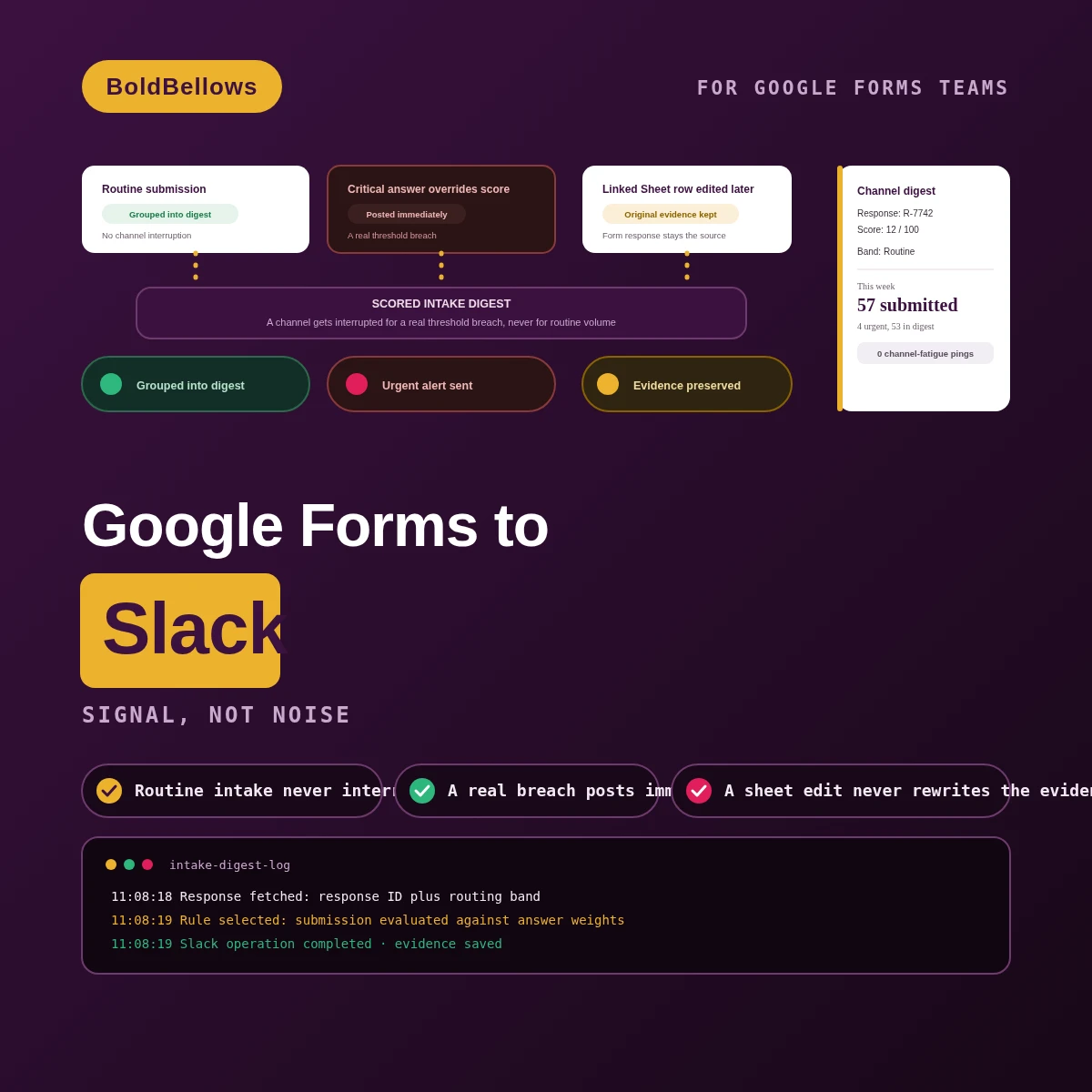
When routine intake pings a channel exactly as loudly as something urgent, people learn to stop reading Slack notifications altogether. We score every submission against a documented weighting first, so a channel interruption is reserved for a real threshold breach and everything else lands in a scheduled digest.
From $275, paid once.
No monthly connector fee.
01The every-ping-the-same trap
A generic connector usually posts every submission the moment it arrives, with the same visual weight whether it's routine paperwork or something that genuinely needs eyes on it right now. Channels adapt by muting the whole conversation.
Every entry posted identically, so nobody could tell an ordinary intake apart from something that actually needed a fast response.
Without any scoring, an alert that needed same-hour attention looked exactly like the forty routine ones posted right before it.
A Slack message has no built-in sense of whether someone read it and handled the request or just scrolled past it.
An interruption is a request for attention right now. Spending that request on routine volume is how a channel loses its ability to signal anything at all.
Same form, same submissions. The difference is whether a channel interruption still means something, or has been worn down to background noise.
Before
After
02How it works
The response gets claimed and scored first, the routing band decides urgent versus routine second, an urgent match posts immediately, and everything routine waits for its next scheduled digest.
03What powers the scoring engine
The urgency router and threshold test bench ship with Starter. The weighted scorer and digest compiler join at Growth. The privacy summary and acknowledgment marker complete the model at Scale.
StarterGrowthScale
Sends only a genuine threshold breach to the channel immediately.
Runs known responses through every routing band before launch, not after.
Evaluates answer-level points and applies critical overrides where they belong.
Groups routine entries into one timed operational summary instead of many pings.
Shows decision fields in the channel while sensitive answers stay behind a link.
Tracks whether a routed alert actually received human attention.
Keeps a response the scorer can't confidently weigh visible until someone reviews it.
We watch real scoring outcomes closely for a full month after going live.
04Who it's for
Team leads protecting channel attention, triage analysts reviewing high-risk answers, program coordinators reading daily volume, and form owners adjusting thresholds over time.
Protects channel attention and would rather a ping mean something every time it fires.
Reviews high-risk answers and needs a critical override to always cut through the digest.
Reads daily volume through a scheduled digest instead of scrolling a noisy channel.
Adjusts thresholds over time and wants to see exactly what a change would have caught.
05Compare
Posting every submission the moment it arrives is a five-minute setup. Keeping a channel interruption meaningful over months of real volume is the part most connectors never attempt.
| What's checked | Post-everything webhook | Manual channel checks | BoldBellows build |
|---|---|---|---|
| Urgency scoring | NoEvery submission posts at the same volume | PartialRelies on someone reading everything closely | YesWeighed against a documented rule |
| Critical overrides | NoNo concept of one answer changing urgency | PartialDepends entirely on who's watching that day | YesA critical answer always breaks through |
| Acknowledgment | NoNo record of whether anyone actually saw it | NoTracked only in someone's memory | YesMarked and visible per alert |
| A failed post | PartialOnly visible to whoever inspects the log | NoNever gets raised at all | YesHeld for retry against its claimed response |
A submission scores low overall, but one critical answer should override that and still trigger an alert. The handler checks stable question identity against the approved rule, not just the aggregate score.
Someone edits a linked Sheet row after submission, but the original form response never changed. The response stays retained as the source of evidence, with the sheet edit noted but never treated as authoritative.
PricingClear, one-off packages
Pick how much scoring and digest logic your channel genuinely needs, and the price reflects it in real time. Setting up your first scored channel starts at $275.
View PricingPick a package, answer three short questions about intake, respondent matching and form-edit policy, and your price and turnaround move as you choose.
06The process
Starter's narrow scope, one form and one channel, usually clears testing inside a week. Growth's weighted scorer and digest compiler need a bit more time to get right against your actual answer set. Scale's privacy summary and acknowledgment tracking, once proven against real urgent cases, can stretch toward twelve days. Chasing a rollout date? Say so during intake, and picking a quicker speed tier shrinks that whole timeline.
We work with whoever currently triages this channel and turn their existing judgment into a documented scoring rule.
You approve how often routine entries get summarized, and what exactly counts as a critical override.
We configure the capture, the scoring engine and every Slack message it's permitted to post.
A low-total submission with one critical override, a borderline score right at the threshold, and a Sheet row edited after the fact all get thrown at it before launch.
We sit in the channel alongside your team through the first live alerts and confirm the scoring feels right in practice.
07Security and ownership
This build posts only to the channel and message templates it's configured for. Every other channel, workspace app and unrelated automation in Slack stays entirely outside its reach.
Posting access is configured against a single Slack channel, exactly the one this build was set up to serve.
Rather than guess a new question's weight, scoring pauses there until someone assigns it one.
The channel message shows only decision-relevant fields; anything more sensitive requires opening the protected link.
Nobody browsing the form or its Apps Script code can find what actually authorizes a Slack post.
The response ID and routing band keep a resend from generating a second channel message.
The weighting rules, the digest template and every underlying script transfer to you fully at delivery.
08In their words
Verified reviews from teams who use BoldBellows automations every day, from alert design and channel hygiene to sales and support.
AI Email & Smart Inbox Management
Our inbox used to be chaos. BoldBellows built an AI email system that sorts messages, drafts replies and flags anything urgent.
It learns how we write and gets better every week. We reply faster and no longer miss important messages. It feels like having a personal assistant working around the clock.
AI Accounting & Invoice Automation
BoldBellows automated our whole invoicing process: creating invoices, sending reminders and tracking payments.
Late payments dropped sharply, and our accounting team finally has time for strategy instead of repetitive admin. Worth every penny.
AI Document & Contract Automation
Onboarding was slow because we wrote every contract by hand. BoldBellows automated the lot: contracts, welcome emails and client setup.
What took 48 hours now takes under 10 minutes, and clients regularly tell us how professional it feels.
AI Content & Social Media Automation
Our marketing agency couldn’t keep up with content. BoldBellows set up an AI content engine that writes blog posts and captions and even designs our social media creatives.
It spots trends and suggests topics for us, so we stay ahead of competitors. We now produce three times the content with the same team, and engagement has soared. They didn’t just automate our workflow, they lifted our whole brand.
AI Voice Assistant
BoldBellows built a custom AI voice assistant for our customer hotline. It answers questions, books appointments and handles simple requests.
Customers love how fast it is, and our call-centre workload dropped dramatically. One of the smartest upgrades we’ve made.
AI Workflow Automation for Agencies
Running a digital agency with many clients was overwhelming. BoldBellows built one automation dashboard that tracks tasks, sends updates and creates client reports automatically.
Clients love the transparency and we love the time we get back. Productivity is up, and project delays have dropped to almost zero.
AI HR & Recruitment Automation
Our HR team was drowning in applications. BoldBellows automated screening, skills-based filtering and interview scheduling.
It saves us hours every week and means we only interview qualified people. Hiring is now faster, better organized and more professional.
AI Lead Qualification & Sales Automation
Our sales team wasted hours chasing cold leads. BoldBellows built an AI lead-scoring system that reads behavior, email engagement and buying signals.
It filters out weak leads and sends personalized follow-ups automatically, so our team only talks to people who are ready to buy. Conversions rose 40% in the first month. It paid for itself straight away.
AI Customer Journey Automation
We wanted a smoother path from first contact to purchase. BoldBellows built an AI system that guides each customer there automatically.
It sends personalized messages, recommends products and follows up at just the right moment. Customer retention has improved dramatically.
AI Chatbot & Customer Support
BoldBellows built an AI support chatbot for our online boutique, and it has changed how we run the business. We used to have two full-time staff answering the same questions all day. Now the AI handles order tracking, product recommendations and even refund requests on its own.
What surprised me most is how natural it sounds. Customers compliment the ‘agent’ without realizing it’s AI. Our support workload dropped by 75% and customer satisfaction went up dramatically.
AI Video & Voice Automation
We publish product videos every week, and BoldBellows introduced us to AI video automation. The system writes the script, voices it and produces the finished video in minutes.
The quality is remarkable: professional voiceovers, clean visuals and smooth editing. Production time went from three days to under 30 minutes, and we scaled our video marketing without adding cost.
AI Booking & Scheduling Automation
Our coaching business needed a better way to schedule. BoldBellows automated all of it: bookings, reminders, cancellations and follow-ups.
No-shows fell by 60% and clients enjoy how smooth it is. It feels personal, not robotic. One of the best upgrades we’ve made.
AI Translation & Localisation
When we expanded abroad we needed fast, accurate translations. BoldBellows built an AI translation system that turns our content into several languages instantly.
The translations read naturally and suit each culture. We now serve customers in five new countries without hiring translators. BoldBellows helped us go global.
AI Data Entry & Reporting Automation
We used to spend hours collecting data and building weekly reports by hand. BoldBellows automated all of it.
The reports are clean, visual and easy to read, and our managers rely on them for quick decisions. Human error is gone and our numbers are more accurate across the board.
AI E-commerce Listings Automation
BoldBellows automated our product listings. The AI writes descriptions, organizes photos and publishes listings across several marketplaces.
It even answers customer questions instantly. Our store looks more professional and sales have noticeably increased.
AI Social Comment & DM Automation
We get thousands of comments and messages every week. BoldBellows built an AI system that replies instantly, filters spam and surfaces the important ones.
Engagement is up and our page looks active around the clock. It’s like having a full social media team that never stops.
AI CRM Automation
Our CRM was barely used because updating it by hand was tedious. BoldBellows automated data entry, tagging, segmentation and follow-ups.
Now the CRM is always up to date and our campaigns are far more accurate. It improved our whole sales pipeline.
AI Automation Partner
BoldBellows is hands-down the best AI automation partner we’ve worked with. Their systems are fast, reliable and built around how our business actually works.
Every automation they’ve delivered, from customer service to content, runs flawlessly. We’ve saved time, cut costs and grown faster than we expected.
09FAQ
Still unsure? We reply in plain English.
You do, during setup, and it's revisitable afterward. The threshold test bench shows exactly which past submissions a proposed change would have caught before you commit to it.
Yes. The weighting lives in its own configuration, kept separate from the capture and posting logic, so adjusting one answer's weight doesn't mean touching anything else.
Not usually. Slack's workflow builder doesn't score or weigh incoming data on its own. This exists specifically for teams whose Google Forms intake needs that judgment applied before anything posts.
Nothing recurring comes from BoldBellows. This is paid once, and your Google Workspace and Slack plans just continue as they always have.
A genuinely new question needs its own weight assigned before it factors into scoring. Until that happens, submissions containing it wait in the exception queue rather than being scored incorrectly.
Add the legacy response backfill extra and it becomes possible. Every past submission runs through the current weighting and gets summarized, so nothing urgent from before launch slips by unnoticed. This page also answers searches for google forms to slack, google forms responses slack notification and google forms slack alert automation.
Next stepStop training your channel to ignore Slack
Show us what a genuinely urgent submission looks like for your team, and we'll build the scoring rule your channel needs around it. Wiring your first channel through scoring runs $275.