View all app connections
View all AI automations
View all chatbots
View all lead automations
View all booking automations
View all payment automations
View all workflows
View all Shopify
View all WooCommerce
View all HubSpot
View all Salesforce
View all Stripe
View all Google Sheets
View all Slack
View all dental practice
View all law firm
View all medical practice
View all real estate
View all restaurant and food
View all home services
View all construction
See all: get more leads
See all: get paid faster
See all: save admin time
See all: support customers
See all: book more appointments
See all: sell more online
See all: hire and onboard
View all AI automations

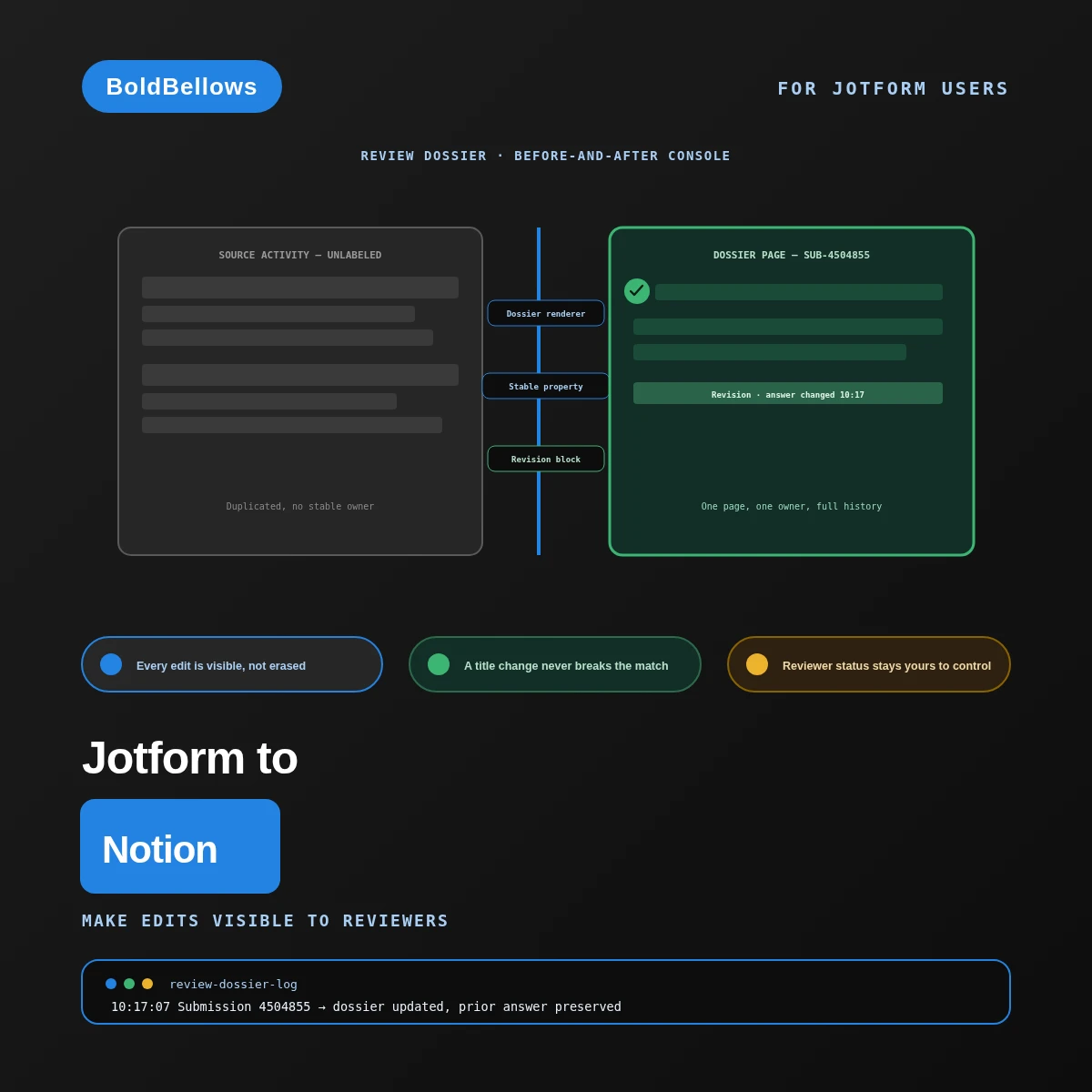
BoldBellowsMake edits visible to reviewers

Stop letting a Jotform edit disappear into the latest answer

By the time a reviewer opens an applicant's page, the respondent may have already gone back and changed an answer — and a flat Notion sync only ever shows what's true right now, with no hint that the reviewed version ever looked different. We build one dossier page per applicant that keeps the current answer and every prior version that led there, side by side.

View Pricing

From $395, paid once.
No monthly sync fee.

  • Every edit appears as its own visible block
  • A retitled application never loses its page
  • Review Dossier is typically live in under a week
Jotform to Notion automation by BoldBellows: a reviewer dossier that turns every Jotform submission edit into a visible before-and-after block on one Notion page
Edit logged, visibly Prior answer stays on the page SUBMISSIONS · THIS WEEK New dossiers built22 Edits appended as revisions11 Pages broken by a title change0 Nothing a reviewer saw ever quietly vanishes

What a Jotform edit has to pass through before a dossier updates

  • Each page is keyed to an immutable propertya title or email edit can never break the match
  • A changed field appends as its own dated blockthe earlier answer stays readable underneath
  • Reviewer status lives apart from respondent editsa new answer never resets a decision already made
  • A write that can't land surfaces for a personit doesn't just quietly fail to appear
  • The build is a single quoted projectnever a fee that grows with how many pages exist

01The vanished-version trap

A page that only shows "now" is a page hiding what actually happened

A basic sync rewrites a Notion page's properties each time it hears about that submission again, edit included, so whatever a reviewer actually read, discussed and decided on gets quietly replaced — and the page never lets on that anything used to look different.

"A fellowship committee approved an application, then the applicant edited a key detail, and nobody could tell what the committee had actually seen."

The one page reflected only the newest answer once the edit landed, leaving no way to confirm what the committee had actually approved.

"A candidate updated their name on the form, and the sync built them a whole second page instead of updating the first."

With the page keyed to a mutable title instead of a stable identifier, a routine edit fractured one applicant into two records.

"An answer edit reset the reviewer status back to 'not started,' as if nobody had ever looked at the application at all."

Without a real separation between the reviewer's own status and the respondent's answers, one field's update stomped on the other.

A page that only ever shows the newest answer isn't a record of the application — it's a snapshot that keeps replacing itself. The revision block and stable property exist so a dossier can honestly show what a reviewer actually saw, not just what's true this instant.

Same intake form, same submissions. The difference is whether a page carries its own history, or overwrites itself every time something changes.

Before

Notion page, overwritten silently Revision block: none Stable property: none
  • An edit erases the version a reviewer saw
  • A title change can fork one applicant into two pages
  • An edit can silently overwrite a reviewer's status

After

Dossier for SUB-4504855, 2 revisions Same page, keyed to a locked property ✓ Old and new answers both stay visible ✓ Reviewer status untouched by the edit ○ Decision snapshot ready once a call is made
  • Every version a reviewer saw stays on the page
  • A title change never creates a duplicate
  • A decision stays attached to what earned it

02How it works

A three-stop spiral, winding inward toward a verified core

Picture a spiral winding inward: the outer ring observes the raw Jotform event, the middle ring translates it into a Notion decision, and the innermost core is the verified write itself. When something can't be trusted at a given ring, a short spur kicks it back out to the previous checkpoint for another pass, rather than letting it spiral all the way in unresolved.

OUTER RING · OBSERVE MIDDLE RING · TRANSLATE WRITE + PROVE Spur → back to prior ring OBSERVE TRANSLATE WRITE + PROVE
Every submission spirals inward through the same two rings before reaching the verified core. Anything uncertain at a ring kicks back out on the spur instead of forcing its way to the center.

Why identity resolves before content ever changes

  • Observe locates the page by its locked property. The applicant's title, email or any visible field can change freely without ever affecting which page the update lands on.
  • Translate diffs the new answers against the old ones. Only what actually changed becomes a revision block — an unchanged field doesn't clutter the page with a redundant entry.
  • Write leaves reviewer status completely alone. A respondent's edit updates the dossier content, never the human decision recorded separately on the same page.

03What the review-dossier build includes

From a rendered page to a fully governed decision archive

Review Dossier ships with the dossier renderer and stable submission property. The revision block and review-state protection join at Revision Workflow. Long-answer chunking and a decision snapshot complete the governed archive at Decision Archive.

Review DossierRevision WorkflowDecision Archive

Dossier log SubmissionFieldChangeStatus SUB-4504855Budget$4,200 → $4,800Appended SUB-4504867—New submissionBuilt SUB-4504879TimelineQ2 → Q3Appended SUB-4504891—New submissionBuilt SUB-4504885SponsorConflictHeld for review Uncertain match → held, history preserved Jotform ReadDiffedWrittenVerified Dossier log SubmissionStatus SUB-4504855Appended SUB-4504867Built SUB-4504879Appended SUB-4504885Held Uncertain match → held for review Jotform Read+ 3 more views

Dossier renderer Review Dossier

Builds readable sections on the page from your Jotform answer map.

Stable submission property Review Dossier

Keys the page by an immutable value, never a title that can be edited.

Revision block Revision Workflow

Appends a changed field with its old value, new value and the exact time.

Review-state protection Revision Workflow

Keeps a reviewer's status completely separate from a respondent's edits.

Long-answer chunking Decision Archive

Splits a long narrative safely across blocks without breaking its sequence.

Decision snapshot Decision Archive

Freezes exactly the evidence a reviewer had in front of them at the moment of decision.

Scheduled reconciliation Decision Archive

Sweeps for a submission whose event notification never actually arrived.

Thirty-day stabilization review Decision Archive

Watches a real month of live edits before we call the archive finished.

PROGRAM HEALTH Dossiers built, this month Unresolved page conflicts, this month Open count 1
Decision Archive adds this view — dossiers built climbing steadily while page conflicts stay small and named.

04Who it's for

Built for people who review the same applicant twice

Fellowship reviewers who need to know exactly what an applicant said at the moment of decision, hiring coordinators tired of losing track of an edited resume field, research leads wary of a form change quietly rewriting the workspace, and compliance analysts who want a failed write to leave a visible trace.

Fellowship reviewer

Can pull up exactly what an applicant's page said the day a decision was recorded.

Hiring coordinator

Stops losing track of which resume version a candidate actually submitted last.

Research lead

Trusts that a consent form edit lands as a tracked revision, not a silent overwrite.

Compliance analyst

Sees exactly which page stalled and why, instead of a gap nobody noticed until an audit.

05Compare

Where a plug-and-play integration drops the applicant's paper trail

A quick webhook-to-database setup writes a submission into Notion without a second thought, and treats a later edit the exact same way: overwrite and move on. Keeping the earlier answer readable, keying by something that can't change, and protecting a recorded decision is where that convenience runs out.

Comparing manual note-taking, a generic connector, and the BoldBellows review-dossier build
What an honest applicant record needsManual note-takingGeneric connectorBoldBellows build
Edit handlingOverwrites whatever was written beforeOverwrites the page in placeYesAppends each edit as its own dated block
Page identityWhoever's taking notes decides by handOften keyed by a title that can changeYesKeyed by an immutable submission property
Reviewer statusTracked separately, easy to loseCan get reset by an unrelated editYesHeld apart from respondent-side changes
Duplicate handlingSomeone has to spot it by handA resend risks a second, forked pageYesMatched against a key that can't drift, no fork

The single-field edit trap

A respondent changes just one answer in an otherwise long application. The revision block appends only that one field as its own entry, instead of rewriting the entire page as if everything had changed.

The oversized-narrative trap

A long-form answer exceeds what a single Notion block can hold. Long-answer chunking splits it safely across several blocks in the right order, instead of truncating it or failing the write outright.

PricingClear, one-off packages

Give every applicant a page that remembers

Review Dossier, Revision Workflow and Decision Archive differ mainly in how much revision depth and archival logic sits around the base page. Tell us roughly how many times a typical application gets touched after it first lands, and we'll size the build to match. Review Dossier opens at $395.

View Pricing
Pricing

Build your Jotform to Notion price

Pick a package, answer three short questions about event delivery, identity and exception handling, and your price and turnaround move as you choose.


Choose your packageRequired

The three packages differ by how much revision detail and recovery logic sits around the dossier page.

One Jotform form and one Notion database, rendered into a readable dossier page.

  • One authorized Jotform form, one Notion destination
  • Dossier renderer building readable sections from your answer map
  • Stable submission property immune to a title or email edit
  • Deduplication using the submission ID in a locked Notion property
  • Normal and replay acceptance tests
  • Focused administrator handoff

A revision block and review-state protection turn a static page into a living record.

  • Everything in Review Dossier
  • Revision block appending old value, new value and time
  • Review-state protection keeping reviewer status separate from edits
  • One bounded historical backfill
  • Visible exception ownership
  • Mapping and recovery register

Long-answer chunking and a decision snapshot keep the archive governed as volume grows.

  • Everything in Revision Workflow
  • Long-answer chunking for narrative fields, sequence preserved
  • Decision snapshot freezing the evidence behind a recorded outcome
  • Scheduled source-to-destination reconciliation
  • Advanced edge-case test suite
  • Thirty-day stabilization review

Several Jotform forms, multiple Notion databases, regulated retention, custom extensions or unsupported add-ons. Tell us the real scope and we will price it for your build.

How should a submission reach the dossier?Required

Dual path adds a scheduled check alongside the live webhook for full coverage.

How should a dossier page trace back to its Jotform submission?Required

Conflict quarantine adds a queue for a match the rule can't confidently resolve.

What happens when a Notion write fails?Required

A human review queue takes more setup than a stop, but nothing silently falls through.

How soon do you need it live?Required

Standard follows the schedule your other choices set. Pay to move up the queue and go live sooner.

Optional extrasOptional

Each one begins switched off. Turn on what your rollout needs, watch the total, switch it back off.

06The process

We look at how your database is structured before a page gets built

Review Dossier comes together with the least setup — one form, one database, and a renderer that just needs your section layout confirmed. Revision Workflow takes longer, since review-state protection has to be checked against a genuine edit-after-review case before your team trusts it. Decision Archive runs longest, because long-answer chunking needs real oversized narrative fields to prove the splitting logic holds up. Is one particular field notorious for repeated edits? Say so up front and we'll plan the timeline with that in mind.

Before we open your database Which property should never be allowed to change How the dossier sections should be laid out How far a historical submission import should reach Who reviews a page when a match looks uncertain Set once, tuned to your real database structure Rehearsal run Simulated set: 38 submissions Submissions processed 38 Dossiers built 31 History lost 0 Ready for your workspace
  1. Find an applicant with more than one version on file

    We open a genuine multi-revision case together and trace exactly which details a flat overwrite would have wiped out.

  2. Agree on the dossier layout

    You approve which sections the renderer builds and how a revision block should read before anything goes live.

  3. Connect it to your real form and workspace

    The dossier renderer, stable property and identity key all get set up against your actual Jotform form and Notion database.

  4. Throw the awkward cases at it first

    A single-field edit, an oversized narrative answer and a title change all get tested before the dossier ever touches a live page.

  5. Watch one page update live, then hand it off

    Your team watches a genuine edit land as a revision block on the real page, before the dossier runs without supervision.

Three things to have ready

  • Someone on your side able to grant Jotform access for the relevant form.
  • Edit access to the Notion workspace and database this build writes to.
  • One real submission with more than one revision, if you happen to have one.

07Security and ownership

The dossier reads one form and writes one database, nothing more

Only the form this dossier was actually built to read is visible to it — nothing else in your Jotform account is ever within its grasp. In Notion, the integration writes to the one database it was configured against and nowhere else.

Credentials stop at this one dossier

Whatever this build can reach is limited to the form and database it was actually set up against.

Unmapped answers simply never leave the form

The renderer only pulls what its reviewed structure calls for — anything else stays behind in Jotform, untouched.

The stable property locks before a page is touched

Identity is confirmed ahead of the write, so a resend updates the right page instead of forking a duplicate.

A stuck write doesn't just keep hammering away

The build tries a genuinely recoverable failure a limited number of times, then stops and hands it off as a named task instead.

Logs track outcomes, not a second copy of the content

What's kept for troubleshooting is which page updated and when — never a duplicate archive of the answers themselves.

The dossier structure ships fully documented

Page layout, revision logic and the stable property setup all come explained at handoff, ready for your team to extend.

08In their words

What BoldBellows clients say

Verified reviews from review teams who trust BoldBellows to keep an applicant's history honest, not just current.

AI Document & Contract Automation

Onboarding was slow because we wrote every contract by hand. BoldBellows automated the lot: contracts, welcome emails and client setup.

What took 48 hours now takes under 10 minutes, and clients regularly tell us how professional it feels.

Michael O’ConnorVerifiedDublin, Ireland

AI Lead Qualification & Sales Automation

Our sales team wasted hours chasing cold leads. BoldBellows built an AI lead-scoring system that reads behavior, email engagement and buying signals.

It filters out weak leads and sends personalized follow-ups automatically, so our team only talks to people who are ready to buy. Conversions rose 40% in the first month. It paid for itself straight away.

Aisha MohammedVerifiedDubai, UAE

AI HR & Recruitment Automation

Our HR team was drowning in applications. BoldBellows automated screening, skills-based filtering and interview scheduling.

It saves us hours every week and means we only interview qualified people. Hiring is now faster, better organized and more professional.

Olivia MartinezVerifiedAustin, USA

AI Workflow Automation for Agencies

Running a digital agency with many clients was overwhelming. BoldBellows built one automation dashboard that tracks tasks, sends updates and creates client reports automatically.

Clients love the transparency and we love the time we get back. Productivity is up, and project delays have dropped to almost zero.

Samuel BoatengVerifiedAccra, Ghana

AI Voice Assistant

BoldBellows built a custom AI voice assistant for our customer hotline. It answers questions, books appointments and handles simple requests.

Customers love how fast it is, and our call-centre workload dropped dramatically. One of the smartest upgrades we’ve made.

Hannah JohnsonVerifiedChicago, USA

AI Chatbot & Customer Support

BoldBellows built an AI support chatbot for our online boutique, and it has changed how we run the business. We used to have two full-time staff answering the same questions all day. Now the AI handles order tracking, product recommendations and even refund requests on its own.

What surprised me most is how natural it sounds. Customers compliment the ‘agent’ without realizing it’s AI. Our support workload dropped by 75% and customer satisfaction went up dramatically.

Maria GonzálezVerifiedMadrid, Spain

AI E-commerce Listings Automation

BoldBellows automated our product listings. The AI writes descriptions, organizes photos and publishes listings across several marketplaces.

It even answers customer questions instantly. Our store looks more professional and sales have noticeably increased.

Pedro LimaVerifiedSão Paulo, Brazil

AI Translation & Localisation

When we expanded abroad we needed fast, accurate translations. BoldBellows built an AI translation system that turns our content into several languages instantly.

The translations read naturally and suit each culture. We now serve customers in five new countries without hiring translators. BoldBellows helped us go global.

Kenji NakamuraVerifiedOsaka, Japan

AI Email & Smart Inbox Management

Our inbox used to be chaos. BoldBellows built an AI email system that sorts messages, drafts replies and flags anything urgent.

It learns how we write and gets better every week. We reply faster and no longer miss important messages. It feels like having a personal assistant working around the clock.

Chloe AndersonVerifiedMelbourne, Australia

09FAQ

Questions that come up before a review workspace launches

Curious how the dossier would handle a particular field on your form? Request a quote and bring a real submission, and we'll walk through exactly what would appear.

Doesn't Notion already keep its own page history?

Notion's history tracks changes to the page as a document, not what a specific Jotform answer used to say. This build's revision block reads as plain content on the page itself, tied to the submission it came from, which the generic file history was never built to show.

Wouldn't a basic Zapier zap get most of this done?

A zap can create or refresh a page on a trigger, but nothing about it treats identity as something that has to survive a title change, and it has no notion of a revision block — a new answer just replaces the old one. Both of those are what this build actually handles.

Could a retried webhook accidentally log the same edit as two separate revisions?

It shouldn't happen. The stable property gets checked against the incoming event before anything is written, so a repeat delivery lands on the page and revision already on record rather than adding a fresh one.

Does this include what we pay Notion for our workspace?

It doesn't — you're only paying for the build here. Whatever workspace plan you have with Notion continues on its own, unaffected by this.

Our form has been collecting responses for a while — can that backlog become dossiers too?

It can, going back as far as we agree makes sense for your case. Each past submission is built into a full dossier page first and reconciled on its own, so nothing lands in your database half-formed.

What if we restructure the Jotform question order later?

The answer mapping is documented as its own configuration, separate from the renderer's logic, so a reordered question is an update to that mapping, not a rebuild of the dossier. It is also the answer to jotform to notion, sync jotform submissions to notion and jotform notion integration.

Next stepStop losing track of what an applicant used to say

Give every applicant a page that keeps the whole story

Bring one real submission, ideally an applicant who edited something along the way, the Notion database it should feed, and the field your reviewers keep asking about. From there, we can put a number on it. Review Dossier starts at $395.

  • From $395, paid once
  • Every edit becomes its own visible block
  • A title change never forks a second page
  • A recorded decision is never quietly overwritten