View all app connections
View all AI automations
View all chatbots
View all lead automations
View all booking automations
View all payment automations
View all workflows
View all Shopify
View all WooCommerce
View all HubSpot
View all Salesforce
View all Stripe
View all Google Sheets
View all Slack
View all dental practice
View all law firm
View all medical practice
View all real estate
View all restaurant and food
View all home services
View all construction
See all: get more leads
See all: get paid faster
See all: save admin time
See all: support customers
See all: book more appointments
See all: sell more online
See all: hire and onboard
View all AI automations

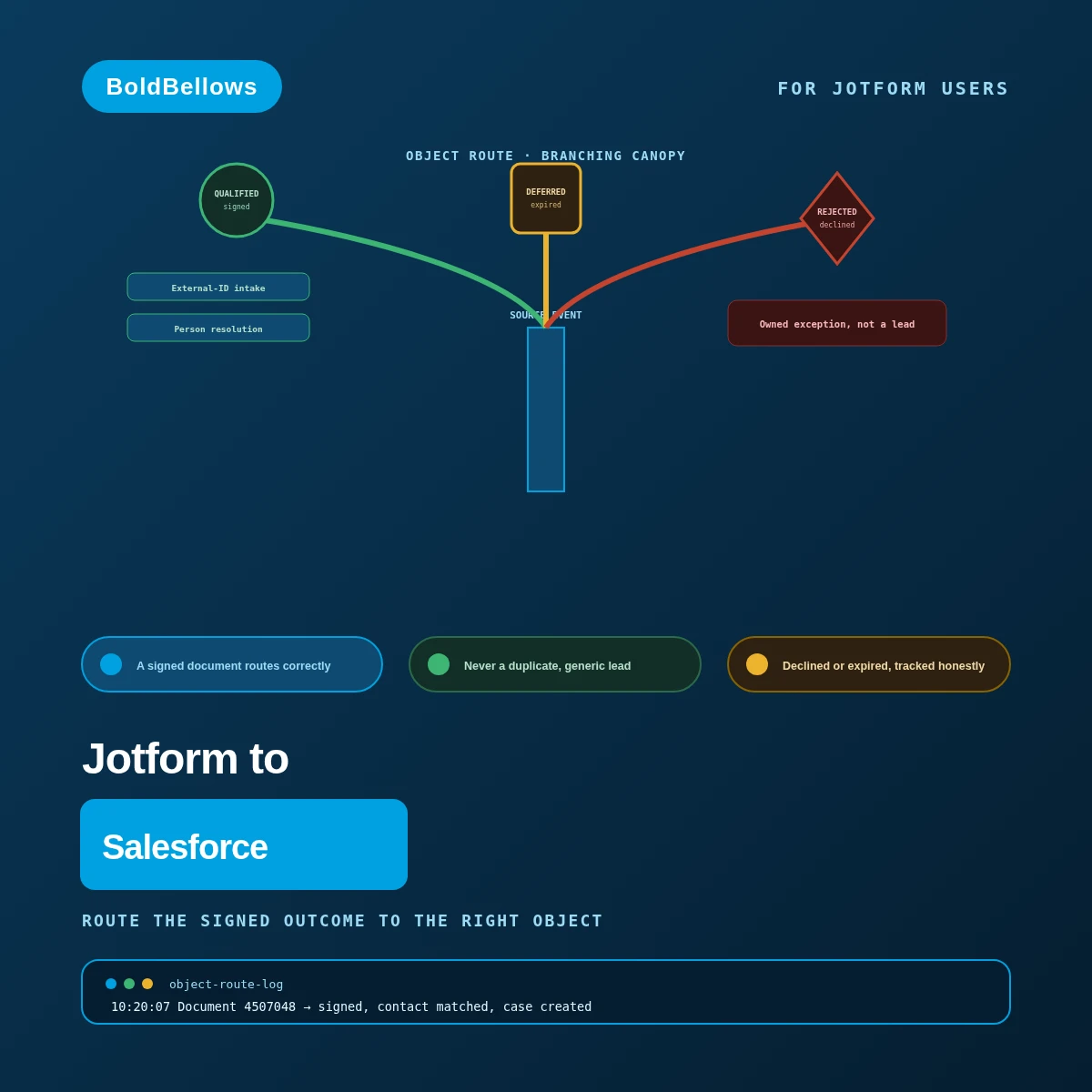
BoldBellowsRoute the signed outcome to the right object

Stop flattening a signed Jotform agreement into a generic Salesforce lead

A finished Jotform Sign packet is a legal document with an actual outcome — signed, declined, or expired — not just another form fill. A generic connector treats it exactly like one anyway, dumping it into a bare Lead with no contract context. We read the real document state and route it to the Salesforce object that state actually calls for.

View Pricing

From $600, paid once.
No monthly sync fee.

  • A signature never gets reduced to a bare lead
  • A signer resolves against real CRM history
  • Object Route is typically live in under a week
Jotform to Salesforce automation by BoldBellows: a signature-completion router that sends a finished Jotform Sign packet to the correct Salesforce object instead of a generic Lead
Signed, routed correctly Matched to a real Contact first DOCUMENTS · THIS WEEK Documents classified29 Routed to Case or contract22 Duplicate leads avoided22 Every signed document lands where it belongs

What a Jotform document has to establish before a CRM record writes

  • The document's actual state gets classified firstsigned, declined and expired are never treated alike
  • Every write carries a Salesforce external IDa retry updates the same record, never a second one
  • A signer resolves against Contacts before anything writesa stale Lead never wins over real CRM history
  • A related write that fails gets its own ownerit doesn't just disappear from the record
  • The whole engagement is a single negotiated feedocument volume never changes what you owe

01The flattened-lead trap

A signature reduced to a lead is a contract with no context left

A generic connector sees a completed form and does what it always does: create a Lead. It has no idea the "form" was actually a legal agreement someone just signed, no idea the signer already exists as a Contact somewhere in your org, and no idea a signed document should probably never become a Lead at all.

"A client who'd been with us for two years signed a renewal, and it created a brand-new Lead as if they'd never heard of us."

Nothing checked whether the signer already existed as a Contact, so a returning client's history and a fresh Lead sat side by side, disconnected.

"A declined agreement showed up in Salesforce looking identical to a signed one, and sales almost followed up as if the deal had closed."

With no classifier reading the real document state, a rejection and a completed signature both landed as the same generic record.

"The Contact write succeeded but the linked Case failed silently, and nobody noticed the contract had no case attached to it for weeks."

Without a journal tracking which related writes actually landed, a partial success looked identical to a complete one from the outside.

A Lead is a guess at future business. A signed agreement is already a fact. Collapsing the two into the same object erases exactly the distinction your CRM exists to preserve. The document-state classifier and object route exist to keep that distinction intact.

Same signing form, same completed documents. The difference is whether Salesforce reflects what actually happened, or just that a form got submitted.

Before

Lead created, every document Document-state check: none Person resolution: none
  • A returning client gets a fresh, disconnected Lead
  • A declined agreement looks the same as a signed one
  • A failed related write can go unnoticed for weeks

After

Document 4507048, state: signed Classified before any object gets touched ✓ Signer matched to an existing Contact ✓ Routed to a Case, not a duplicate Lead ○ Partial-success journal recording what's pending
  • A returning signer connects to their real record
  • A declined document is tracked as exactly that
  • A partial failure is visible, never silent

02How it works

Three groups of dominoes, each stopped by a validation gate before the next falls

Picture three groups of dominoes lined up in sequence. The first group falls once the raw Jotform state is confirmed. A gate between groups checks whether it's safe to continue before the second group is even allowed to fall. The final group reaches Salesforce only once everything before it checked out — and if a prerequisite is missing, the next group simply stays upright, untouched, owned by whoever needs to look at it.

OBSERVE GATE TRANSLATE GATE WRITE + PROVE Missing prerequisite → next group stays upright, owned OBSERVE TRANSLATE WRITE + PROVE
Each group only falls once the gate before it confirms it's safe. Nothing forces a fall past a missing prerequisite.

Why the object gets chosen before anything gets written

  • Observe classifies the document's actual state. Whether it's signed, declined or expired gets determined before anything else about the Salesforce write is even considered.
  • Translate resolves the signer before picking an object. A match against an existing Contact happens first, so the write knows whether it's touching new or existing CRM history.
  • Write logs every related write's own outcome. A Contact succeeding while a Case fails is recorded as exactly that, not smoothed over into one generic success.

03What the object-route build includes

From a classified document to a fully governed contract intake

Object Route ships with external-ID intake and the document-state classifier. Person resolution and purpose-specific object routing join at CRM Resolution. An Opportunity gate and partial-success journal complete the governed intake at Contract Operations.

Object RouteCRM ResolutionContract Operations

Intake log DocumentStateObjectStatus DOC-4507048SignedCaseRouted DOC-4507061SignedCaseRouted DOC-4507075ExpiredArchiveRouted DOC-4507088SignedCaseRouted DOC-4507070Declined—Tracked, no CRM opportunity Declined document → tracked, never promoted Jotform ReadClassifiedRoutedVerified Intake log DocumentStatus DOC-4507048Routed DOC-4507061Routed DOC-4507075Routed DOC-4507070Tracked Declined document → tracked, not promoted Jotform Read+ 3 more views

External-ID intake Object Route

Makes a retry update the same Salesforce intake record, never a duplicate.

Document-state classifier Object Route

Separates a submitted, signed, declined and expired outcome from one another.

Person resolution CRM Resolution

Matches a signer against existing Contacts and Leads under governed rules.

Purpose-specific object route CRM Resolution

Creates a Case, contract record or Campaign Member, whichever the document calls for.

Opportunity gate Contract Operations

Requires real commercial qualification beyond just a captured signature.

Partial-success journal Contract Operations

Records exactly which related writes succeeded and which still need repair.

Scheduled reconciliation Contract Operations

Sweeps for a document event whose webhook silently never arrived.

Thirty-day stabilization review Contract Operations

Holds the intake under active watch through one full month of real signings.

PROGRAM HEALTH Documents routed, this month Partial-success cases, this month Open count 1
Contract Operations adds this view — routed documents climbing steadily while partial-success cases stay small and named.

04Who it's for

Built for people who answer for what's actually in the CRM

Salesforce architects who need every object to hold exactly what it's supposed to, contracts administrators tired of chasing down which document actually went where, sales operations managers who don't want a form tweak reshuffling how records get routed, and program enrollment leads who want a failed write to surface loudly.

Salesforce architect

Can trust that a Lead in the pipeline is actually a lead, not a signed contract mislabeled.

Contracts administrator

Stops manually cross-referencing Jotform Sign against Salesforce after every renewal.

Sales operations manager

Can change a form field without wondering whether the object routing will still work tomorrow.

Program enrollment lead

Doesn't discover a missing enrollment record weeks later — the gap shows up immediately, with a name on it.

05Compare

Where a generic sync flattens the document into a lead

A quick webhook-to-CRM setup will happily create a Lead the second a form submits, whether that form was a newsletter signup or a signed contract. Classifying the real document state, resolving the signer, and routing to the correct object is where that speed runs out.

Weighing manual data entry, a generic connector, and the BoldBellows object-route build
What honest contract routing needsManual data entryGeneric connectorBoldBellows build
Document stateSomeone reads the PDF by handNot distinguished at allYesClassified before any object gets chosen
Signer identityA rep searches for the right ContactAlways creates a fresh LeadYesResolved against existing Contacts first
Object selectionWhatever the rep decides that dayOne fixed object for every submissionYesChosen by the document's actual purpose
Failure visibilityDepends who happens to noticeA blocked related record fails silentlyYesLogged in a partial-success journal

The dual-record trap

A signer already exists as a Contact, but a stale Lead from an old campaign is also sitting in the org. Person resolution weighs both and picks the record that actually reflects reality, instead of the write landing on whichever one happened to match first.

The pending-approval trap

A document is fully signed, but a required internal approval hasn't cleared yet. The Opportunity gate holds it from becoming a full Opportunity until that approval actually lands, rather than assuming a signature alone means the deal is done.

PricingClear, one-off packages

Give every signature the object it actually deserves

Object Route, CRM Resolution and Contract Operations differ mainly in how much person-matching and recovery logic sits around the base route. Walk us through which Salesforce objects your signed documents should actually create, and the price follows your real setup. Object Route opens at $600.

View Pricing
Pricing

Build your Jotform to Salesforce price

Pick a package, answer three short questions about event delivery, identity and exception handling, and your price and turnaround move as you choose.


Choose your packageRequired

The three packages differ by how much person-matching and recovery logic sits around the object route.

One Jotform Sign packet and one Salesforce object, routed by actual document state.

  • One authorized Jotform form, one Salesforce destination
  • External-ID intake keyed to submission or document ID
  • Document-state classifier separating signed, declined and expired
  • Deduplication using the external ID on every write
  • Normal and replay acceptance tests
  • Focused administrator handoff

Person resolution and purpose-specific routing turn a signed packet into real, connected CRM history.

  • Everything in Object Route
  • Person resolution matching Contacts and Leads under governed rules
  • Purpose-specific object route to a Case, contract record or Campaign Member
  • One bounded historical backfill
  • Visible exception ownership
  • Mapping and recovery register

An Opportunity gate and partial-success journal keep contract intake governed as volume grows.

  • Everything in CRM Resolution
  • Opportunity gate requiring commercial qualification beyond a signature
  • Partial-success journal tracking which related writes still need repair
  • Scheduled source-to-destination reconciliation
  • Advanced edge-case test suite
  • Thirty-day stabilization review

Several Jotform forms, multiple Salesforce orgs, regulated retention, custom extensions or unsupported add-ons. Tell us the real scope and we will price it for your build.

How should a completed document reach Salesforce?Required

Dual path adds a scheduled check alongside the live webhook for full coverage.

How should a Salesforce record trace back to its Jotform document?Required

Conflict quarantine adds a queue for a match the rule can't confidently resolve.

What happens when a Salesforce write fails?Required

A human review queue takes more setup than a stop, but nothing silently falls through.

How soon do you need it live?Required

Standard follows the schedule your other choices set. Pay to move up the queue and go live sooner.

Optional extrasOptional

Each one begins switched off. Turn on what your rollout needs, watch the total, switch it back off.

06The process

We map your object model before a single Salesforce record writes

Object Route requires the fewest moving parts: one form, one Salesforce destination, and a classifier that just needs your object mapping confirmed. CRM Resolution takes longer, since person resolution has to be checked against your org's real duplicate rules before it can be trusted. Contract Operations runs longest, because the partial-success journal needs a genuine related-write failure to prove the recovery path actually works. Running more than one document type through this form? Say so during scoping so it's accounted for from the start.

Before we open your org Which Salesforce object each document state maps to How a signer should be matched against Contacts How far a historical document import should reach Who owns a partial-success case when one appears Set once, tuned to your real object model Rehearsal run Simulated set: 32 documents Documents processed 32 Records routed 30 Mismatched objects 0 Ready for your org
  1. Walk through a real signed document together

    We look at an actual completed packet and trace exactly which Salesforce object it should have created in the first place.

  2. Confirm your object model together

    You approve which document state maps to which Salesforce object before the routing logic ever runs live.

  3. Get it running against your actual setup

    The classifier, person resolution and identity key each get pointed at your real Jotform form and the Salesforce org you named.

  4. Push the hard cases through first

    A signer who matches both a Contact and a stale Lead, a blocked related write, and a duplicate delivery all get rehearsed before anything goes live.

  5. Let one genuine document run the whole path

    A real signed packet gets classified and lands in the right Salesforce object with your team observing, before the intake operates unsupervised.

Three things to have ready

  • Whoever manages Jotform Sign for the form in scope.
  • A Salesforce administrator who can confirm object permissions and duplicate rules.
  • A few real documents, including one that was declined or left incomplete.

07Security and ownership

The build reaches one form and the objects it's actually cleared for

This intake reads exactly one Jotform form, chosen deliberately during setup — everything else in the account is out of its reach. In Salesforce, write access covers only the objects this build was explicitly configured to route into.

Nothing beyond the cleared objects is reachable

The permission set this build runs under names exactly which Salesforce objects it can touch, and stops there.

Only what the routing logic actually needs leaves Jotform

A field the classifier and object router don't reference stays behind in the form, never forwarded.

The external ID locks in before Salesforce is touched

Every write checks the external ID first, which is exactly what lets a resend land on the record already there rather than a new one.

A blocked write doesn't get forced through

If an org rule or permission blocks a related write, the build backs off and records the block rather than retrying blindly.

Logs hold outcomes, not a duplicate document store

What's kept for troubleshooting is which object a document routed to and when — never a second copy of the signed content.

The routing logic ships yours to keep and edit

Object mappings, matching rules and the exception process all transfer at handoff, fully documented for your own team.

08In their words

What BoldBellows clients say

Verified reviews from RevOps and contracts teams who trust BoldBellows to keep signed agreements out of the generic lead pile.

AI Workflow Automation for Agencies

Running a digital agency with many clients was overwhelming. BoldBellows built one automation dashboard that tracks tasks, sends updates and creates client reports automatically.

Clients love the transparency and we love the time we get back. Productivity is up, and project delays have dropped to almost zero.

Samuel BoatengVerifiedAccra, Ghana

AI Social Comment & DM Automation

We get thousands of comments and messages every week. BoldBellows built an AI system that replies instantly, filters spam and surfaces the important ones.

Engagement is up and our page looks active around the clock. It’s like having a full social media team that never stops.

Sofia DimitrovVerifiedSofia, Bulgaria

AI Content & Social Media Automation

Our marketing agency couldn’t keep up with content. BoldBellows set up an AI content engine that writes blog posts and captions and even designs our social media creatives.

It spots trends and suggests topics for us, so we stay ahead of competitors. We now produce three times the content with the same team, and engagement has soared. They didn’t just automate our workflow, they lifted our whole brand.

Daniel BrooksVerifiedToronto, Canada

AI Data Entry & Reporting Automation

We used to spend hours collecting data and building weekly reports by hand. BoldBellows automated all of it.

The reports are clean, visual and easy to read, and our managers rely on them for quick decisions. Human error is gone and our numbers are more accurate across the board.

Sarah MüllerVerifiedZurich, Switzerland

AI Translation & Localisation

When we expanded abroad we needed fast, accurate translations. BoldBellows built an AI translation system that turns our content into several languages instantly.

The translations read naturally and suit each culture. We now serve customers in five new countries without hiring translators. BoldBellows helped us go global.

Kenji NakamuraVerifiedOsaka, Japan

AI Video & Voice Automation

We publish product videos every week, and BoldBellows introduced us to AI video automation. The system writes the script, voices it and produces the finished video in minutes.

The quality is remarkable: professional voiceovers, clean visuals and smooth editing. Production time went from three days to under 30 minutes, and we scaled our video marketing without adding cost.

Lucas SteinerVerifiedMunich, Germany

AI Voice Assistant

BoldBellows built a custom AI voice assistant for our customer hotline. It answers questions, books appointments and handles simple requests.

Customers love how fast it is, and our call-centre workload dropped dramatically. One of the smartest upgrades we’ve made.

Hannah JohnsonVerifiedChicago, USA

AI HR & Recruitment Automation

Our HR team was drowning in applications. BoldBellows automated screening, skills-based filtering and interview scheduling.

It saves us hours every week and means we only interview qualified people. Hiring is now faster, better organized and more professional.

Olivia MartinezVerifiedAustin, USA

AI Chatbot & Customer Support

BoldBellows built an AI support chatbot for our online boutique, and it has changed how we run the business. We used to have two full-time staff answering the same questions all day. Now the AI handles order tracking, product recommendations and even refund requests on its own.

What surprised me most is how natural it sounds. Customers compliment the ‘agent’ without realizing it’s AI. Our support workload dropped by 75% and customer satisfaction went up dramatically.

Maria GonzálezVerifiedMadrid, Spain

09FAQ

Questions Salesforce teams ask before committing

Not sure how your document types map onto Salesforce objects? Request a quote and walk us through a real signed packet, and we'll be specific about what it would take.

Wouldn't Salesforce's native Web-to-Lead already handle this?

Web-to-Lead does exactly what its name says: it creates a Lead. It has no concept of a signed document's actual state or of matching a signer against a Contact already in your org — that judgment is what this build supplies.

Isn't this exactly what a Zapier integration is built for?

A zap fires the same way whether the "form" was a newsletter signup or a signed contract — it has no notion of document state and won't check whether the signer is already a Contact. Both of those checks are the whole point of this build.

What happens if a signer's details get corrected after signing?

That correction gets matched against the same document already on file. From there, whichever exception treatment you picked takes over — updating the record, logging it as a note, or holding it until someone signs off.

Is our Salesforce license cost part of what we're paying here?

It isn't — the number above covers our work and nothing else. Your Salesforce edition and license count keep running on their own account, untouched by this.

We've been signing agreements through this form for a while — can that history be brought into Salesforce properly?

It can, within a window we scope together. Each past document runs through the same classifier and person resolution logic, and gets reconciled before any of it reaches your production org.

What if we add a new agreement type that needs its own object route?

That's a smaller job than it sounds — the object mapping lives on its own, separate from the classifier's core logic, so a new document type just means extending that mapping. If you searched for jotform to salesforce, sync jotform submissions to salesforce and jotform salesforce integration, this is the service that delivers it.

Next stepStop treating a contract like a cold lead

Send every signature to the object it earned

Bring one real signed document, the Salesforce object it should actually create, and the CRM mismatch your team has already run into once. That's what we'll price against. Object Route starts at $600.

  • From $600, paid once
  • A signed document never becomes a bare Lead
  • A returning signer connects to their own history
  • A blocked related write is visible, not silent