One long line per order
Everything crammed into a sentence means scanning past text to find the one number that actually matters.
BoldBellowsA card, not a text line
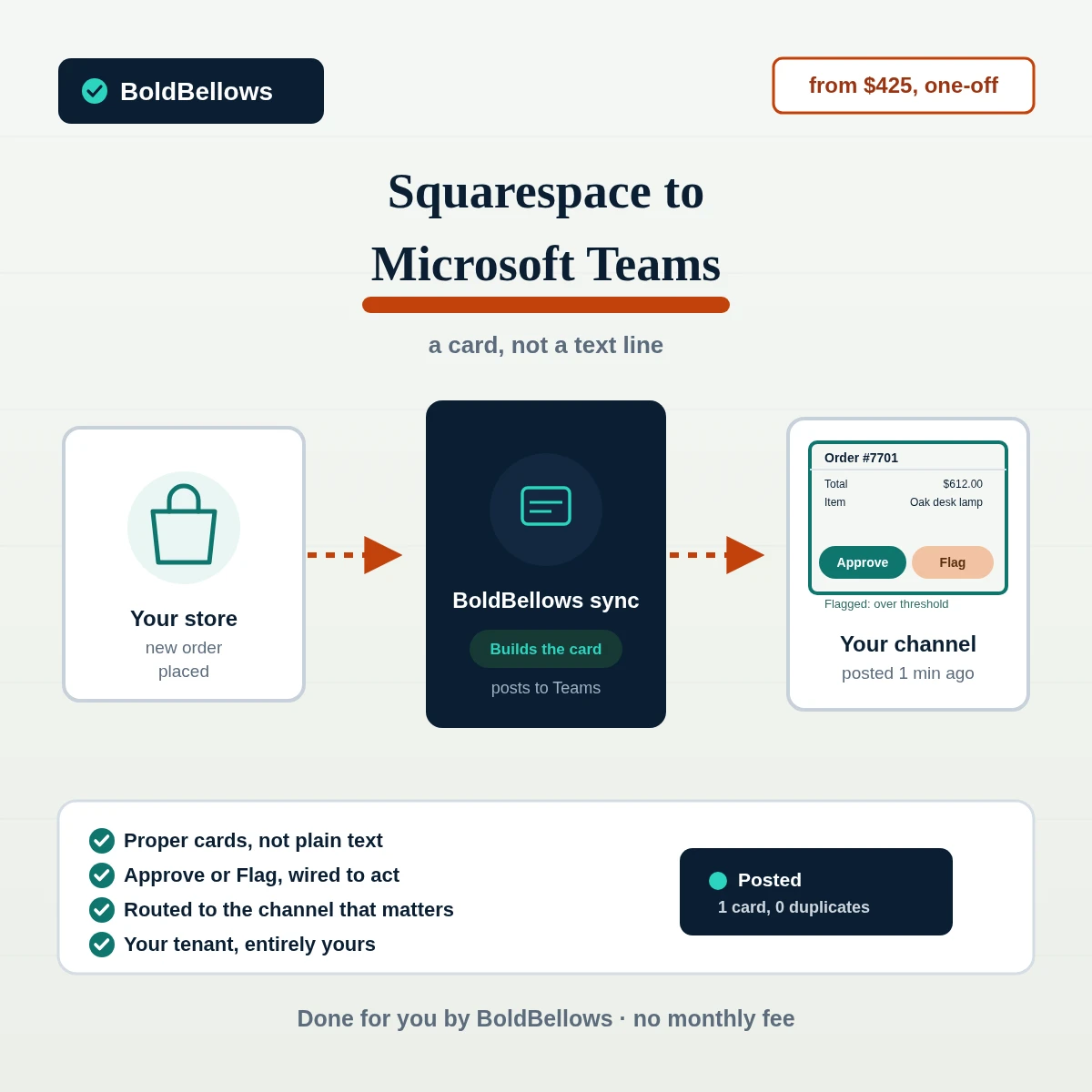
We build a sync that lands each Squarespace order in your Teams channel as a proper Adaptive Card, fields laid out cleanly, with an Approve or Flag button for the builds that call for one. Nothing about your Squarespace store gets touched in the process.
Billed once, starting at $425
Microsoft 365 licensing stays separate
Chapter 01The flat-notification habit
The fastest way to wire Squarespace into Teams is a plain text webhook message, same as you'd post into Slack. It works, technically, but it leaves everything Teams can actually do with a card sitting unused.
We paid for Teams because it's already how the company works, and our order alerts still looked like something copy-pasted from a Slack setup. No card, no fields, nothing to click.
Everything crammed into a sentence means scanning past text to find the one number that actually matters.
A high-value order that genuinely needs a second look gets the same passive treatment as a routine one.
A $15 candle and a $600 commission land in the same place, at the same volume, with the same priority.
Before
After
Chapter 02How it works
Three parts sit between your store and a channel that says something useful. Squarespace is checked, never changed; the sync builds the card and, where it applies, decides which channel it belongs in.
This build looks at orders and nothing further; your listings, pricing and store settings are never within reach of it.
Each order's card is tracked internally, so a later check doesn't post the same order into the channel a second time.
Where it's included, clicking Approve on a card actually fires a Power Automate flow, not a static button that does nothing.
Chapter 03The channel
This is what shows up in the channel once your package is live, from a bare-bones order card up to one that carries a working approval button.
Every paid order posted once, fields laid out cleanly, no duplicates.
Orders sorted by category or value, so a busy channel stays focused.
Approve or Flag buttons on cards over your threshold, wired through Power Automate.
Every post logged, so a card that failed to send is easy to catch and fix.
Chapter 04Who this fits
If your order alerts read like a Slack message that wandered into Teams by mistake, giving them real cards is what actually uses the platform you're paying for.
Someone with authority gets an actual button to click, not a message they then have to act on somewhere else.
A channel that actually distinguishes a routine order from one that needs eyes on it right away.
An approval card that plugs straight into flows you or your IT team have already built.
One tenant, correctly routed regardless of which Squarespace site an order actually came in through.
Chapter 05The options
Getting text into a channel is the trivial half of this. Building a card with real fields and an action that actually fires is where most quick approaches stop trying.
| Question | Manual posting | Zapier or Make | Generic connector app | BoldBellows build |
|---|---|---|---|---|
| Posts a proper Adaptive Card | Not without someone building it by hand each time | Possible, but usually skipped for a plain message | Sometimes, on a higher tier | Yes, fields laid out on every card |
| Includes a working approval action | Not something manual posting offers | Outside what a generic automation platform wires up | Rarely offered at all | Wired in through Power Automate, when your package includes it |
| Prevents duplicate posts | Relies entirely on whoever's typing to remember what they posted | Possible, if it was built with real care | Usually, within its own scope | Tracked internally, checked every pass |
| What it costs over time | Free, aside from the time it eats up | Costs that scale with how many orders you get | Somewhere between $15 and $45 monthly | One-off price from $425 |
| Where it lives | Your own Teams tenant | Routed through a third party's own infrastructure | Constrained to that app's fixed card templates | Posted straight in, under your tenant's own name |
The part that decides if anyone reads it. A wall of plain text trains a team to skim past the channel entirely. A card with clear fields, and an action on the ones that matter, is what keeps people actually checking it.
InterludeA channel worth reading
Three short questions about order coverage, card detail and refresh speed set both the price and the go-live date below, updating live as you answer them. Most channels are live within a week and a half.
From $425, billed once · You own everything we build
Pick a package, answer three short questions about which orders post, how detailed each card is and how often Teams refreshes, and your price and go-live date move as you choose.
Chapter 06The build
Each stage hands off to the next until real cards are landing in your channel. Your side of it comes to roughly twenty minutes total, spread across a short setup call and one review pass near the end.
Kickoff
We settle which order types post where, what counts as high-value, and whether any of it needs an approval step before a single card is built.
Ten minutes on your side
You generate a read-only Squarespace API key and add an Incoming Webhook to your Teams channel, both from short guides written for this exact step.
Where the time goes
The Adaptive Card layout goes together first, then the routing logic that decides which channel each order lands in, then any Power Automate approval action your package includes.
Before your channel sees any of it
A separate channel only we can see gets the first batch of cards, built from actual recent orders, so a layout or routing mistake never reaches your team.
Your review window
You open the test channel, click any Approve or Flag buttons your package carries, and tell us what to adjust before it moves anywhere live.
Handover
Documentation covering the card fields, routing rules and any approval flow arrives at handover, and the sync then runs on its schedule without anyone tending it.
Chapter 07Trust
Order totals and buyer detail post somewhere everyone with channel access can read, so what feeds it stays deliberately limited on both ends.
The API key posting cards into your channel can see order detail and stop there; changing what's for sale, or any other store setting, never enters the picture.
The Incoming Webhook this build posts through reaches the single channel it was created for; it has no way to post into any other channel or team.
Where an approval action is part of the build, the flow behind it lives in your own Power Automate environment, not somewhere we host or control.
Delete the webhook or revoke the Squarespace key and the connection ends immediately; nothing further needs to be undone on our end.
Fields used to build a card exist only long enough to post it; we keep no separate database of your orders or buyer detail.
Your Microsoft 365 and Teams licensing stays your own arrangement; BoldBellows bills a single amount for the build itself and nothing further.
"An approval button in a shared channel is only as trustworthy as the flow behind it. We test every card and every action against orders that actually happened before we call a build done."
Steven GrratFounder, BoldBellows
Chapter 08In their words
Verified reviews from business owners running BoldBellows automations across marketing, fulfillment, reporting and more, on the Squarespace to Microsoft Teams route.
AI CRM Automation
Our CRM was barely used because updating it by hand was tedious. BoldBellows automated data entry, tagging, segmentation and follow-ups.
Now the CRM is always up to date and our campaigns are far more accurate. It improved our whole sales pipeline.
AI HR & Recruitment Automation
Our HR team was drowning in applications. BoldBellows automated screening, skills-based filtering and interview scheduling.
It saves us hours every week and means we only interview qualified people. Hiring is now faster, better organized and more professional.
AI Video & Voice Automation
We publish product videos every week, and BoldBellows introduced us to AI video automation. The system writes the script, voices it and produces the finished video in minutes.
The quality is remarkable: professional voiceovers, clean visuals and smooth editing. Production time went from three days to under 30 minutes, and we scaled our video marketing without adding cost.
AI Chatbot & Customer Support
BoldBellows built an AI support chatbot for our online boutique, and it has changed how we run the business. We used to have two full-time staff answering the same questions all day. Now the AI handles order tracking, product recommendations and even refund requests on its own.
What surprised me most is how natural it sounds. Customers compliment the ‘agent’ without realizing it’s AI. Our support workload dropped by 75% and customer satisfaction went up dramatically.
AI E-commerce Listings Automation
BoldBellows automated our product listings. The AI writes descriptions, organizes photos and publishes listings across several marketplaces.
It even answers customer questions instantly. Our store looks more professional and sales have noticeably increased.
AI Workflow Automation for Agencies
Running a digital agency with many clients was overwhelming. BoldBellows built one automation dashboard that tracks tasks, sends updates and creates client reports automatically.
Clients love the transparency and we love the time we get back. Productivity is up, and project delays have dropped to almost zero.
AI Document & Contract Automation
Onboarding was slow because we wrote every contract by hand. BoldBellows automated the lot: contracts, welcome emails and client setup.
What took 48 hours now takes under 10 minutes, and clients regularly tell us how professional it feels.
AI Lead Qualification & Sales Automation
Our sales team wasted hours chasing cold leads. BoldBellows built an AI lead-scoring system that reads behavior, email engagement and buying signals.
It filters out weak leads and sends personalized follow-ups automatically, so our team only talks to people who are ready to buy. Conversions rose 40% in the first month. It paid for itself straight away.
AI Translation & Localisation
When we expanded abroad we needed fast, accurate translations. BoldBellows built an AI translation system that turns our content into several languages instantly.
The translations read naturally and suit each culture. We now serve customers in five new countries without hiring translators. BoldBellows helped us go global.
AI Content & Social Media Automation
Our marketing agency couldn’t keep up with content. BoldBellows set up an AI content engine that writes blog posts and captions and even designs our social media creatives.
It spots trends and suggests topics for us, so we stay ahead of competitors. We now produce three times the content with the same team, and engagement has soared. They didn’t just automate our workflow, they lifted our whole brand.
AI Email & Smart Inbox Management
Our inbox used to be chaos. BoldBellows built an AI email system that sorts messages, drafts replies and flags anything urgent.
It learns how we write and gets better every week. We reply faster and no longer miss important messages. It feels like having a personal assistant working around the clock.
AI Booking & Scheduling Automation
Our coaching business needed a better way to schedule. BoldBellows automated all of it: bookings, reminders, cancellations and follow-ups.
No-shows fell by 60% and clients enjoy how smooth it is. It feels personal, not robotic. One of the best upgrades we’ve made.
AI Accounting & Invoice Automation
BoldBellows automated our whole invoicing process: creating invoices, sending reminders and tracking payments.
Late payments dropped sharply, and our accounting team finally has time for strategy instead of repetitive admin. Worth every penny.
AI Data Entry & Reporting Automation
We used to spend hours collecting data and building weekly reports by hand. BoldBellows automated all of it.
The reports are clean, visual and easy to read, and our managers rely on them for quick decisions. Human error is gone and our numbers are more accurate across the board.
AI Customer Journey Automation
We wanted a smoother path from first contact to purchase. BoldBellows built an AI system that guides each customer there automatically.
It sends personalized messages, recommends products and follows up at just the right moment. Customer retention has improved dramatically.
AI Social Comment & DM Automation
We get thousands of comments and messages every week. BoldBellows built an AI system that replies instantly, filters spam and surfaces the important ones.
Engagement is up and our page looks active around the clock. It’s like having a full social media team that never stops.
AI Voice Assistant
BoldBellows built a custom AI voice assistant for our customer hotline. It answers questions, books appointments and handles simple requests.
Customers love how fast it is, and our call-centre workload dropped dramatically. One of the smartest upgrades we’ve made.
AI Automation Partner
BoldBellows is hands-down the best AI automation partner we’ve worked with. Their systems are fast, reliable and built around how our business actually works.
Every automation they’ve delivered, from customer service to content, runs flawlessly. We’ve saved time, cut costs and grown faster than we expected.
Chapter 09Questions
A running list of what comes up on calls before a channel build gets approved. Anything about your particular tenant setup is best raised straight away when you request a quote.
No. Posting cards only needs an Incoming Webhook you add to the target channel yourself. An approval action needs Power Automate access, scoped to that flow.
Yes, with the Channel Router package or above. Category, value or status can each send a card to a channel other than your default one.
A Power Automate flow in your own tenant records who clicked, when, and updates the card in place so the channel shows the outcome, not just the original request.
Yes, the second channel for escalations extra adds a dedicated Incoming Webhook so flagged orders post somewhere separate from routine traffic.
Add the full historical backfill extra and a recent stretch of past orders gets posted as cards too, so the channel isn't only forward-looking from day one.
Add the daily summary card extra and a single morning card totals the previous day's orders alongside your per-order cards, or in place of them if you'd rather.
A stalled poll or a rejected card shows up in the sync health log immediately. Add the aftercare extra and we track it down and retune the routing for three months past handover.
It doesn't. You pay for the build one time. Your Microsoft 365 plan carries on exactly as it does today, billed by Microsoft as always.
A plain notification gets read and forgotten. A proper card with real fields and, where you need it, a working approval button gets acted on. Answer three questions below to see your price, or tell us about your channel setup and we'll quote it directly. If you searched for squarespace orders teams notification, squarespace microsoft teams integration and squarespace teams alert automation, this is the service that delivers it.